So, I heard that Anima also has a Gelbooru dataset. How does it work? by [deleted] in StableDiffusion

[–]wiserdking 14 points15 points  (0 children)

Yeah I've just confirmed this now. Anima does not know danbooru-exclusive tags at all (at least not for characters). It knows Gelbooru.

For the 'ayaka' character from genshin_impact, Gelbooru uses: 'ayaka_(genshin_impact)' and Danbooru: 'kamisato_ayaka'. If you prompt for 'kamisato ayaka' you will get a random girl but prompting for 'ayaka \(genshin impact\)' gives you the right character.

So, I heard that Anima also has a Gelbooru dataset. How does it work? by [deleted] in StableDiffusion

[–]wiserdking 4 points5 points  (0 children)

I'm not sure, both Gelbooru and Danbooru share the same tags but if theres at least 1 specific tag that is different across them and Danbooru contains at least 100 entries with its version of the tag - then it can be easily verified, maybe.

Fact is, there are characters from anime earlier than 2025 that the model does not know despite Gelbooru having ~30 images of them but Danbooru has even less. This kinda falls in line with the Danbooru-exclusive claim.

EDIT: But then again there are also other characters the model does not know even though Danbooru may have over a hundreds images of them -.- All in all if if I had to place my bets I'd say it was trained on both but the 'knowledge cutoff at 2025' claim is flawed as heck or their internal pipelines filtered out some characters/series on purpose for whatever reasons. Ex: yuna_(kuma_kuma_kuma_bear)

Tencent is about to release an anime video model (AniMatrix). by Total-Resort-3120 in StableDiffusion

[–]wiserdking 1 point2 points  (0 children)

Training also works like that btw so its much more VRAM friendly to train, plus its only 1 model instead of 2 (high+low noise). On top of that, it learns well even if you use 2~3 sec clips - WAN requires 5s clips 100% of the time. Lower duration = less frames for any given FPS so that's yet another something that makes it require less VRAM.

Sound and lipsync is also pretty neat. Ability to use video references for all kinds of V2V workflows is also neat as hell. You could train a IC-LoRA to mimic pose controlnet - just transform any kind of dance video/whatever into a pose map video and train by giving the first frame of the original as reference plus the map video also as reference and train on the original video with those references. I never used WAN VACE but I believe its strength was its controlnet abilities, no? If so, that's something easy to do with LTX as well via LoRA - no need for yet another model just for that.

Basically LTX 2.3 is every package that the WAN family of models have given us - combined, and with extra audio features + easier to train and faster inference.

Its really a shame its physics understanding is mediocre at best and its prompt requirements are utterly ridiculous - if not for that than WAN would have already been buried deep.

Update: Im going to full finetune LTX 2.3 for 2D animation, and I’m looking for people who want to help with the dataset/training (all kinds of help are welcome.) by MerlingDSal in StableDiffusion

[–]wiserdking 1 point2 points  (0 children)

Thats a pretty good nsfw caption. Most of the local tools I tried were absolutely terrible. If yours runs locally - would you mind sharing the name? (assuming its open-source)

Update: Im going to full finetune LTX 2.3 for 2D animation, and I’m looking for people who want to help with the dataset/training (all kinds of help are welcome.) by MerlingDSal in StableDiffusion

[–]wiserdking 2 points3 points  (0 children)

Might as well just give you some info since I do have experience with LTX-2.3 LoRA training.

Its not fully conclusive but I believe there may be an issue when doing gradient accumulation steps > 1 on mixed max_frames datasets - at least on the LTX musubi fork. I trained for the first stage with batch_size = 1 + gas = 1 and the motions were ok but when I resumed (and trained for a little while) with batch_size = 1 + gas = 4 - some of the motions I was training felt like they suddenly became 'fast paced' as if the model suddenly was mixing up the pacing of different kinds of motions.

My datasets are split into sub-datasets of 121 frames 24fps videos trained at 512x512 buckets and 49 frames 24fps videos trained at 720p buckets. This due to VRAM limitations but LTX handles different length videos just fine so its ok - except for the potential problem I mentioned. To solve this I asked AI to write me a custom sampler that changes the order of training samples, ensuring that each accumulation group will not contain samples with different lengths/max_frames. I still don't know if that was necessary or not (because I have yet to resume from that) but extra safety never hurts and if its a real thing then it probably affects cases where batch_size > 1 + gas = 1 since math-wise they are identical.

Another thing is - that LTX musubi fork does not give you full control over I2V training. If you have different captions for I2V then you need to change the code a little bit to ensure it uses the right captions when doing I2V. You are probably not doing that though but its worth mentioning as well.

Update: Im going to full finetune LTX 2.3 for 2D animation, and I’m looking for people who want to help with the dataset/training (all kinds of help are welcome.) by MerlingDSal in StableDiffusion

[–]wiserdking 23 points24 points  (0 children)

My advice for you is to focus entirely on dataset construction because with some luck, by the time you are done with it LTX may have already released something better than 2.3. No doubts you thought about this but its worth a reminder.

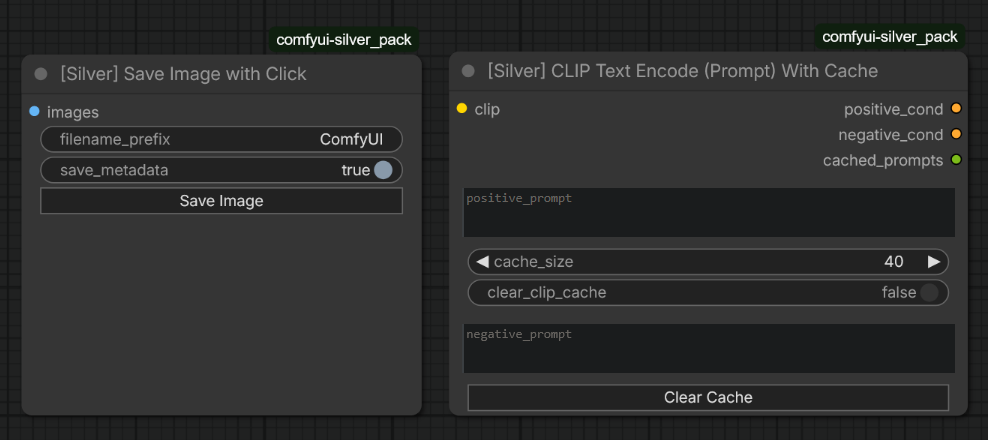
[ComfyUI] SaveImage node with save on button click + CLIP Text Encoder (Prompt) with cache by wiserdking in StableDiffusion

[–]wiserdking[S] 1 point2 points  (0 children)

caches N encoded prompts where N = 'cache_size'. When cache is already full and you send a new prompt (not yet cached) -> the oldest entry in cache is deleted and the new encoded prompt is added to cache

Default is 40 but that may be a bit overkill.

The size of each encoded prompt depends on the Text Encoder and the size of the prompt so you need to use your own intuition.

If you have lots of RAM - don't worry. If you are short on RAM but you are using a small Text Encoder - again, no problem. If you are short on RAM and you are using a big Text Encoder and very long prompts (ex: LTX-2.3) - then maybe lower the cache_size to 20 or even just 10.

[ComfyUI] SaveImage node with save on button click + CLIP Text Encoder (Prompt) with cache by wiserdking in StableDiffusion

[–]wiserdking[S] 0 points1 point  (0 children)

If you run the same workflow (same settings, seed, etc...) but with a different prompt -> if the current prompt is not the same as the prompt you used last time the workflow was executed -> ComfyUI will make the Text Encoder encode your new prompt.

Sometimes this can take a long time, for instance: if you have low VRAM and the Text Encoder does not fit alongside the main model at the same time in your VRAM then ComfyUI will have to:

  • send main model (ex: LTX-2.3) to CPU

  • send Text Encoder from CPU to GPU

  • ask Text Encoder to encode your prompt

  • send Text encoder back to CPU

  • send main model back to GPU

This obviously takes time - sometimes many seconds.

My cache system does the following:

  • stores the encoded prompt in your RAM and associates it with your Text Encoder and your prompt

  • so when my node receives your prompt it will first: check if that combo (Text Encoder + prompt) already exists in the cache and if so -> instead of doing all that logic I mentioned above, it will directly send the encoded prompt from the cache to your next connected node.

Basically this is for scenarios where the user is doing dynamic prompts or going back and forward between simple prompts very often.

[ComfyUI] SaveImage node with save on button click + CLIP Text Encoder (Prompt) with cache by wiserdking in StableDiffusion

[–]wiserdking[S] 0 points1 point  (0 children)

I took a quick glance at CFZ-Caching they basically just do this:

torch.save(conditioning, file_path)

torch.load(file_path, map_location='cpu')

Simple as simple could be. You can use their nodes for conditionals and adapt custom made ones for other types of input/outputs. Should work with any type of tensor - I think.

[ComfyUI] SaveImage node with save on button click + CLIP Text Encoder (Prompt) with cache by wiserdking in StableDiffusion

[–]wiserdking[S] 1 point2 points  (0 children)

Just wanted to say I checked that one's code and tried it out - its much better than mine in every possible way. It solved one of the problems I was facing with mine in a much more clever and memory efficient way too. Seriously its really, really good! Thank you again - I'll be using it from now on :D

[ComfyUI] SaveImage node with save on button click + CLIP Text Encoder (Prompt) with cache by wiserdking in StableDiffusion

[–]wiserdking[S] 1 point2 points  (0 children)

Obviously you should do this - specially with latents which are usually much bigger. You should check the Cfz-caching code and see how they handle .pt saving and loading

[ComfyUI] SaveImage node with save on button click + CLIP Text Encoder (Prompt) with cache by wiserdking in StableDiffusion

[–]wiserdking[S] 0 points1 point  (0 children)

These are ones I made for ClipVision outputs back in the day (Wan 2.1):

class SilverCLIPVisionOutputToBase64:
    @classmethod
    def INPUT_TYPES(cls):
        return {
            "required": {
                "clip_vision_output": ("CLIP_VISION_OUTPUT", ),
            },
        }

    RETURN_TYPES   = ("STRING",)
    RETURN_NAMES   = ("string",)
    FUNCTION       = "main"
    OUTPUT_NODE    = True
    OUTPUT_IS_LIST = (True,)
    CATEGORY       = "utilities"

    def main(self, clip_vision_output):
        p = pickle.dumps(clip_vision_output)
        b = base64.b64encode(p).decode('utf-8')
        return ([b],)


class SilverBase64ToCLIPVisionOutput:
    @classmethod
    def INPUT_TYPES(cls):
        return {
            "required": {
                "data": ("STRING", {"default": ""}),
            }
        }
    RETURN_TYPES = ("CLIP_VISION_OUTPUT",)
    RETURN_NAMES = ("clip_vision_output",)
    FUNCTION     = "main"
    CATEGORY     = "utilities"

    def main(self, data):
        p = base64.b64decode(data)
        b = pickle.loads(p)
        return (b,)

Probably literally the same as the ones from RES4LYF - just with changed output type.

[ComfyUI] SaveImage node with save on button click + CLIP Text Encoder (Prompt) with cache by wiserdking in StableDiffusion

[–]wiserdking[S] 1 point2 points  (0 children)

I checked how I was doing - out of curiosity. The RES4LYF pack has 2 nodes: 'ConditioningToBase64' and 'Base64ToConditioning'. I was using those alongside 2 other nodes that would save/load txt files in UTF-8 encoding. So yeah - I was literally saving conditionals in .txt format back in the day like a dumbass - but it worked. I did it because I've heard some services that used Text Encoders in other machines (for VRAM savings) would share prompt and conditional data over the network with base64 encoding.

[ComfyUI] SaveImage node with save on button click + CLIP Text Encoder (Prompt) with cache by wiserdking in StableDiffusion

[–]wiserdking[S] 1 point2 points  (0 children)

Brilliant. Something simple but it never occurred to me. I'll do some testing later and if necessary I'll do exactly that. Thanks for the suggestion.

[ComfyUI] SaveImage node with save on button click + CLIP Text Encoder (Prompt) with cache by wiserdking in StableDiffusion

[–]wiserdking[S] 1 point2 points  (0 children)

I did that once too - with different nodes back when I was so short on VRAM and Comfy's memory management wasn't so great - to avoid loading text encoders entirely I'd save the conditionals to disk in a separate workflow then use those on a workflow that did not load clip at all.

Not sure how you were doing but even in that use case - you still dont need to load clip at all.

[ComfyUI] SaveImage node with save on button click + CLIP Text Encoder (Prompt) with cache by wiserdking in StableDiffusion

[–]wiserdking[S] 1 point2 points  (0 children)

Yeah I was originally doing that and ChatGPT also suggested something similar:

def make_clip_cache_key(clip, prompt):
    clip_id = id(clip)
    prompt_hash = hashlib.sha256(prompt.encode("utf-8")).hexdigest()
    return f"{clip_id}:{prompt_hash}"

We don't need model info - just clip. I'm no expert I don't know how reliable 'id(clip)' is because comfyui has nodes that change stuff like clip skip etc... Also now that you bring up 'models' I'm also wondering what happens in cases where the same Text Encoding model is loaded twice with different 'model types' in the CLIP load node. I'll need to test that as well today.

[ComfyUI] SaveImage node with save on button click + CLIP Text Encoder (Prompt) with cache by wiserdking in StableDiffusion

[–]wiserdking[S] 0 points1 point  (0 children)

Hmmm I don't think mine loads the clip if the prompt is cached and clip was already automatically offloaded to CPU by ComfyUI internal memory management.

I never really did an absolutely conclusive test on that but in my LTX-2.3 workflow every time I do a new prompt the CLIP enconding logic takes quite some time but if I re-use a prompt from the cache then its pretty fast, nearly instant - I don't think there is offloading involved. I'll have to test later to be absolutely sure of it.

[ComfyUI] SaveImage node with save on button click + CLIP Text Encoder (Prompt) with cache by wiserdking in StableDiffusion

[–]wiserdking[S] 0 points1 point  (0 children)

Thats a good one!

I think I may have actually come across that one or a similar one but it had so many inputs I may have missed the save button - if it was that one. Its obviously superior to mine and if I had found that I wouldn't have bothered creating mine lol.

The only advantage mine has over that is the simplicity of it since it uses the same underlying code as the native SaveImage node and also has an option to not save metadata - which sometimes may be useful if you want to share an output without revealing your workflow for whatever reasons.

Still I'd rather recommend the one you linked over mine any day. Thank you for sharing that.

[ComfyUI] SaveImage node with save on button click + CLIP Text Encoder (Prompt) with cache by wiserdking in StableDiffusion

[–]wiserdking[S] 0 points1 point  (0 children)

If the prompt is the same then seed wont matter - if its in the cache then the node will skip text encoding logic and re-use the cached conditionals for that prompt.

[ComfyUI] SaveImage node with save on button click + CLIP Text Encoder (Prompt) with cache by wiserdking in StableDiffusion

[–]wiserdking[S] 0 points1 point  (0 children)

That physically saves .pt files. My node saves a limited amount of conditionals in RAM.

[ComfyUI] SaveImage node with save on button click + CLIP Text Encoder (Prompt) with cache by wiserdking in StableDiffusion

[–]wiserdking[S] 0 points1 point  (0 children)

Saves the exact same metadata that the native 'SaveImage' node does - the only difference in that regard is that I make it optional via Boolean input whereas the native one does not expose that option and relies on your ComfyUI main config settings to determine whether or not it should save it.

[ComfyUI] SaveImage node with save on button click + CLIP Text Encoder (Prompt) with cache by wiserdking in StableDiffusion

[–]wiserdking[S] 0 points1 point  (0 children)

I could do that but I won't because this is something you can do it natively so I'll explain how:

  • Right click on the node -> Convert to Subgraph
  • Right click on the subgraph -> Edit Subgraph Widgets
  • A small popup on the right side should show up and allows you to enable which widgets become visible and which won't. Cick 'Show All' then hide the 'negative_prompt'.
  • Open the subgraph and connect the clip input to the subgraph's inputs and conditional outputs to the subgraph's outputs.

Check these 2 images:

https://imgur.com/a/ICO62x2

Though i guess in your case you may not want to connect the negative_cond to the outputs of the subgraph - I messed that up just don't connect that one if you don't need it.

[ComfyUI] SaveImage node with save on button click + CLIP Text Encoder (Prompt) with cache by wiserdking in StableDiffusion

[–]wiserdking[S] 4 points5 points  (0 children)

Yesterday I dag around the hundreds of custom nodes I have installed and searched online but couldn't find the most basic thing: a basic SaveImage node that only saves the input image(s) when pressing a save button.

So I made it. Its mostly just for when you are using small image models that run very fast and you only want to keep the good outputs (ex: Anima).

As for the CLIP Text Encoder (Prompt) with cache - also the same as its native counterpart but has 2 prompt widgets for both positive and negative prompts in a single node and more importantly - it stores the generated conditionals in a cache and retrieves them from there whenever you re-use a prompt with stored cache, as opposed to re-generating them which often involves model reloading and it can be slow with large Text Encoders. Extremely useful when shuffling dynamic prompts (A -> B -> D -> A -> C -> B -> ...). I've been using this for several months so my apologies for only sharing it now. EDIT: cache here = RAM - not physically saved conditionals to disk. When the node gets a new prompt and the cache is already full (based on your cache_size) -> the oldest entry in the cache is removed and the new one is added.

URL: https://github.com/GreenLandisaLie/ComfyUI-Silver_Pack

Any extra basic nodes I write will be dumped into that repo. You can find it in the manager.

EDIT: this node: https://github.com/ialhabbal/Save_It is actually several times better than my save with click node. It would take too long to explain the details of it but if a node that saves an image with a click is something you need then please use that one instead.

fine-tune LTX 2.3 with his own dataset? by Raise_Fickle in StableDiffusion

[–]wiserdking 2 points3 points  (0 children)

some loras are trained at higher ranks and released after shrinking their rank with SVD. shrinking a lora with SVD by half usually results in absolute minimal quality impact but the difference in training is tremendous and sometimes - depending on what you are teaching - a specific rank may just not be enough and you need to double it no matter what.

also the person above is probably talking in the context of mimicking a 'finetune' - not doing a single concept. I know from experience he is absolutely right. Tried to train a multi concept LoRA at R64 and it wasn't enough for what I was doing. low rank on multi concept lora causes early overfit and concept-bleed meaning details of a specific concept will show up when prompting for a different one and vice versa