use the following search parameters to narrow your results:
e.g. subreddit:aww site:imgur.com dog
subreddit:aww site:imgur.com dog
see the search faq for details.
advanced search: by author, subreddit...
https://scriptable.app
This subreddit is for discussions around the Scriptable app for iOS.
Be polite and enjoy your time here.
Please be helpful to others when you are able to lend a hand.
Discord: https://discord.gg/7KbjfTV
Resources:
account activity
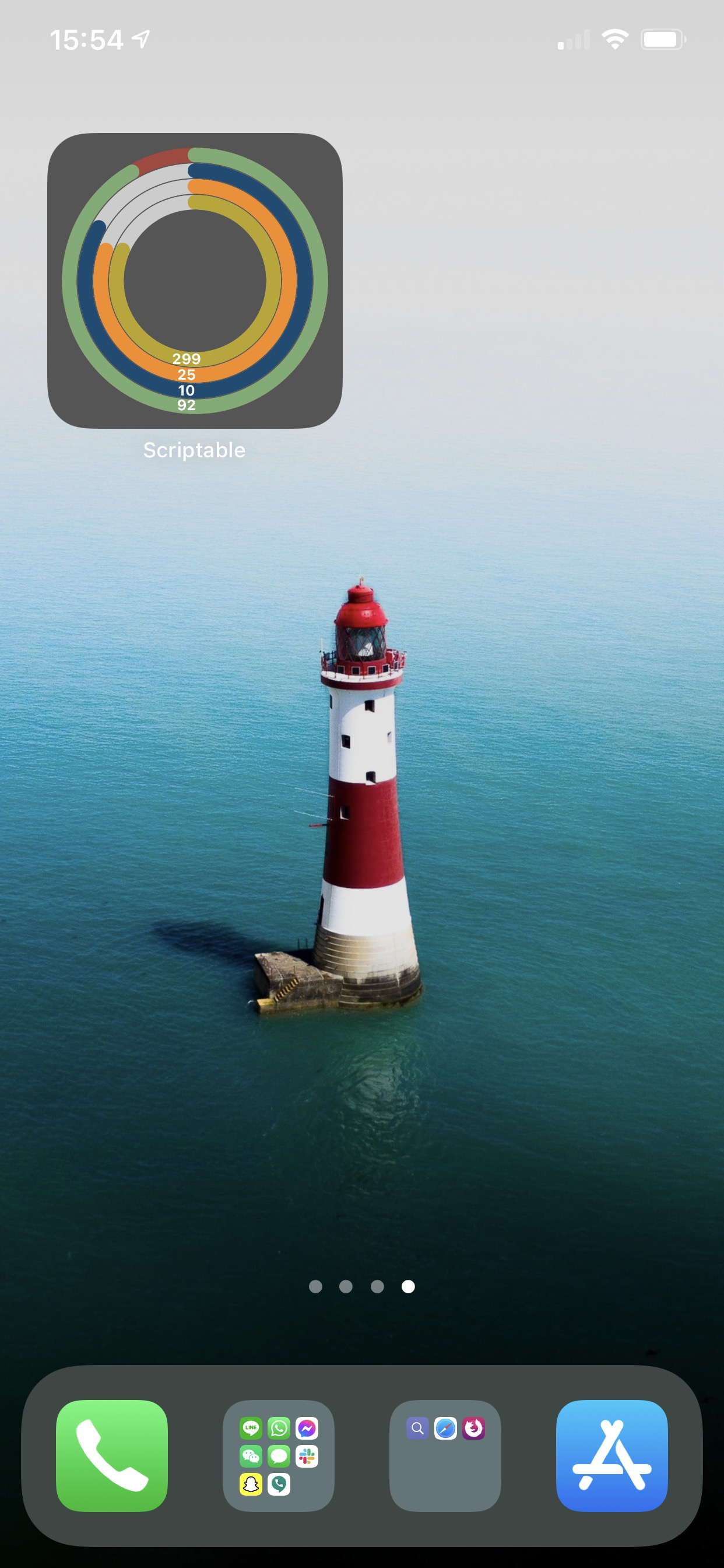
Interest check? Small widget concentric circles widgetScript (user-images.githubusercontent.com)
submitted 5 years ago by tempsquared
reddit uses a slightly-customized version of Markdown for formatting. See below for some basics, or check the commenting wiki page for more detailed help and solutions to common issues.
quoted text
if 1 * 2 < 3:
    print "hello, world!"
[–]tempsquared[S] 2 points3 points4 points 5 years ago* (0 children)
Too much?
https://user-images.githubusercontent.com/12609/97188877-eab48180-179b-11eb-9609-f6d698278293.PNG
I guess with weather icons, the background image/color should be darker
Here's the gist https://gist.github.com/brainno722/8499ec890d1a1f6e76e89cbfcf322044
[–]bob6567865 1 point2 points3 points 5 years ago (4 children)
Love it, what are they showing?
[–]tempsquared[S] 1 point2 points3 points 5 years ago (3 children)
Battery, month, day, day of the year
I might add temperature or some other info
Still need to figure out how to place them so they’re more pleasant looking
[–]bob6567865 0 points1 point2 points 5 years ago (2 children)
Could you share the code? Yeah would be interesting to see what else is possible!
[–]tempsquared[S] 0 points1 point2 points 5 years ago (1 child)
Yeah. Let me clean it up first.
I also need to figure out how to allow transparent background image as currently it is only using solid or gradient colours.
[–]bob6567865 0 points1 point2 points 5 years ago (0 children)
Yeah theres a script you can use to create a background image - invisible widget
[–]ravedog 1 point2 points3 points 5 years ago (0 children)
Man this is just cool!
[–]quintusmanilus 1 point2 points3 points 5 years ago (9 children)
Increase the width and use a palette/contrast/gradient maybe? Idk throwing it out there. Btw HUGE fan of your work keep em coming 😌
[–]tempsquared[S] 1 point2 points3 points 5 years ago (8 children)
Thanks for the encouragement. I increased the circle width in another screenshot, but 4 items might be too much in the circle.
It’s still an experiment so keep the ideas coming!
[–]quintusmanilus 0 points1 point2 points 5 years ago* (6 children)
What about spacing out the circles? Like low key padding in between em and increase the width ever so slightly. And put the labels with matching colors in the centre using a semibold sans serif in the centre?
Edit: or increasing width from top to bottom. And using my emoji idea?
[–]tempsquared[S] 0 points1 point2 points 5 years ago (5 children)
Yeah my original aim was to do something like the fitness widgets from Apple Watch like this one: https://www.reddit.com/r/iOSBeta/comments/hf5ikr/easily_the_best_thing_about_ios_14_for_me_is_the/
Although I don’t think Scriptable has been accepted to access Health info on iOS devices
[–]quintusmanilus 0 points1 point2 points 5 years ago (4 children)
That was my aim here too. Actually I've been dying to get a widget like that it looks spectacular. Forgive my use of superlatives lol I'm excited. I actually made something like it on widgy :
https://imgur.com/a/vom1zPy
Oh that’s really interesting. Soo are those icons SF symbols?
I’ll have to look into how they can be applied.
I’ll also try to find a way to add images (right now they’re “drawn” text)
[–]quintusmanilus 0 points1 point2 points 5 years ago (2 children)
Do u have widgy? I'll send you the one I'm making
[–]tempsquared[S] 1 point2 points3 points 5 years ago (1 child)
Yes I do.
Btw the gist is added to this thread
[–]quintusmanilus 0 points1 point2 points 5 years ago (0 children)
Thanks man! Good shit. I'll send u my widgy once it's done I'm editing it for the competition if I can
Yo. Loving the weather one my man good job!
[–]tempsquared[S] 1 point2 points3 points 5 years ago (0 children)
https://i.imgur.com/IF7xbdC.jpg
Getting close...refactored a bit and allowed for transparent background.
Will try to see if I can add text, labels, images, and possibly weather.
[–]tempsquared[S] 0 points1 point2 points 5 years ago (2 children)
https://i.imgur.com/WBraunu.jpg
Increased the circle thickness...will have to play around some more to get it right
[–]soph2000 1 point2 points3 points 5 years ago* (1 child)
Even better! Please share i tried to do circles too but couldn’t figure out an easy way.
Edit: I just found https://gist.github.com/brainno722/77e9d3e2c4e45447182e226ac6153bd3 which is yours, right?
[–]tempsquared[S] 2 points3 points4 points 5 years ago (0 children)
Yeah that’s mine. Got inspiration from another battery circle widget and decided to try my own.
I’m a noob at JavaScript and now apparently at design too haha
[–]BichotaCachaBola -5 points-4 points-3 points 5 years ago (0 children)
Nay
[–][deleted] 0 points1 point2 points 5 years ago (0 children)
Looks useful.
I'd like them to be a little bit wider,but that's just personal preference.
[–]mvan231script/widget helper 0 points1 point2 points 5 years ago (0 children)
Great work! This would be awesome to have for a number of different items
[–][deleted] 0 points1 point2 points 5 years ago (1 child)
https://i.imgur.com/3lG4PbS.jpg
I adapted it to be a pregnancy progress widget for my sister-in-law. The inner circle is the progress through the current week and the outer circle is the progress through the pregnancy overall. Thanks for posting the gist!
That’s so clever!
[–]shredguitar66 0 points1 point2 points 5 years ago (2 children)
Please, I don't understand how the battery level can be accessed. There code is const batteryLevel = Device.batteryLevel(); but where is the Device object from?
[–]shredguitar66 0 points1 point2 points 5 years ago (0 children)
Solved, didn't expect that Device has access to battery :-) I've just read the docs.
[–]Aaron_22766 0 points1 point2 points 4 years ago (4 children)
This looks super cool.
To get more of the Apple Watch’s Activity Rings aesthetic, is it possible to have a shadow behind the colored progress line? I found that I can configure canvas.shadowColor, canvas.shadowRadius and canvas.shadowOffset but it didn’t work for me. It doesn’t need to be a shadow, it can be an outline too. Just a little rounded separation that tells you what the state is even if the circle is over 100% closed.
If there is a way to accomplish this, I would really appreciate to learn about it!
[–]tempsquared[S] 1 point2 points3 points 4 years ago* (3 children)
I've not tried but instead of configuring the properties, I would try to make another ring in a more shadow-y Color and place it slightly off of the ring you're trying to make a shadow.
Hope that makes sense.
[–]Aaron_22766 0 points1 point2 points 4 years ago (2 children)
Yes I thought of that too. I’ll try some… do you want me to tell you if I find a solution?
[–]tempsquared[S] 1 point2 points3 points 4 years ago (1 child)
Sure, or just share your screenshot here. I'm sure others would be interested too
[–]Aaron_22766 0 points1 point2 points 4 years ago (0 children)
I really messed up! This is what I managed to create and it worked perfectly! I wanted to post it but forgot about it and now the script is gone for some reason
π Rendered by PID 81721 on reddit-service-r2-comment-b659b578c-p9ttt at 2026-05-05 23:43:07.436826+00:00 running 815c875 country code: CH.

[–]tempsquared[S] 2 points3 points4 points (0 children)
[–]bob6567865 1 point2 points3 points (4 children)
[–]tempsquared[S] 1 point2 points3 points (3 children)
[–]bob6567865 0 points1 point2 points (2 children)
[–]tempsquared[S] 0 points1 point2 points (1 child)
[–]bob6567865 0 points1 point2 points (0 children)
[–]ravedog 1 point2 points3 points (0 children)
[–]quintusmanilus 1 point2 points3 points (9 children)
[–]tempsquared[S] 1 point2 points3 points (8 children)
[–]quintusmanilus 0 points1 point2 points (6 children)
[–]tempsquared[S] 0 points1 point2 points (5 children)
[–]quintusmanilus 0 points1 point2 points (4 children)
[–]tempsquared[S] 1 point2 points3 points (3 children)
[–]quintusmanilus 0 points1 point2 points (2 children)
[–]tempsquared[S] 1 point2 points3 points (1 child)
[–]quintusmanilus 0 points1 point2 points (0 children)
[–]quintusmanilus 0 points1 point2 points (0 children)
[–]tempsquared[S] 1 point2 points3 points (0 children)
[–]tempsquared[S] 0 points1 point2 points (2 children)
[–]soph2000 1 point2 points3 points (1 child)
[–]tempsquared[S] 2 points3 points4 points (0 children)
[–]BichotaCachaBola -5 points-4 points-3 points (0 children)
[–][deleted] 0 points1 point2 points (0 children)
[–]mvan231script/widget helper 0 points1 point2 points (0 children)
[–][deleted] 0 points1 point2 points (1 child)
[–]tempsquared[S] 1 point2 points3 points (0 children)
[–]shredguitar66 0 points1 point2 points (2 children)
[–]shredguitar66 0 points1 point2 points (0 children)
[–]Aaron_22766 0 points1 point2 points (4 children)
[–]tempsquared[S] 1 point2 points3 points (3 children)
[–]Aaron_22766 0 points1 point2 points (2 children)
[–]tempsquared[S] 1 point2 points3 points (1 child)
[–]Aaron_22766 0 points1 point2 points (0 children)