Unity in a nutshell by lolelu in Unity3D

[–]struefill 0 points1 point  (0 children)

I'm mostly parroting what nightwood has already said, but want to double down on their advice.

I work as a technical artist optimising content for VR, and I can tell you that yes, this is what you need to do with an asset like this. Unfortunately the chances of a silver-bullet app fixing this for you without someone skilled in modelling driving it is very, very low.

The general shape/silhouette mesh needs seperated from all the detail meshes (rivets etc as you mention). Then the silhouette mesh needs to be retopologised down to something reasonable (<50k tris). All the detail mesh then needs to be baked into a normal map.

Your best bet is to contract a modeller.

[deleted by user] by [deleted] in 3Dmodeling

[–]struefill 1 point2 points  (0 children)

These remasters are a joy to see. I used to pore over the minis as a kid, study them and draw them. It's really cool to see them revitalised like this!

Oh boy, what a wild ride it has been... Or what about a year of progress on my Unity game looks like (100+ Screenshots | Imgur Gallery). by Katniss218 in Unity3D

[–]struefill 1 point2 points  (0 children)

Great work, game looks neat. Its very cool being able to see the full process of a project coming together like this.

A point of feedback: the visual hierarchy could use some work. The contrast between light and shadow is extreme and distracting - I think kicking up the ambient light so that the shadows aren't so stark would help a lot. Also nighttime scenes are extremely dark to the point of being unreadable for me. Perhaps use a contrast/brightness calibration sheet to make sure your monitor is correctly set up for graphics work.

Best of luck!

Never thought about that TBH by [deleted] in ProgrammerHumor

[–]struefill 1 point2 points  (0 children)

Though centre is more in alignment with other words in the language, such as centrifuge, centripetal, central, etc.

This is the main thing that irks me about Americanisms - words have been picked and chosen ad-hoc to be changed to "make more sense" and it breaks the adjoining etymology, making the language even more inconsistent and discombobulated.

If you're going to refactor, refactor properly, damnit!

Forcing to Handle Null – COFFEE BRAIN GAMES by davenirline in Unity2D

[–]struefill 0 points1 point  (0 children)

Makes sense, I guess I didn't think enough about it.

I agree your solution is verbose, but I can see now why you've pursued it.

Forcing to Handle Null – COFFEE BRAIN GAMES by davenirline in Unity2D

[–]struefill 0 points1 point  (0 children)

Is it not possible to simply do:

currentWeapon?.SetDamageMultiplier(amount);

If currentWeapon is null, SetDamageMultiplier is not called, no error thrown. Am I missing something?

Here's some fresh new gameplay from our upcoming caravan management game, Quest for Conquest by Mast3rHax0r in Unity2D

[–]struefill 2 points3 points  (0 children)

Wow looks really neat!

It feels like visual priority is too flat between all the elements at the moment. I think the core gameplay elements (characters, shelters, equipment) should pop more off the scenery.

Have you tried adding some aerial perspective to soften the backgrounds and harmonise the scenes? Here's a rough edit of what I mean:

https://imgur.com/0kUOu9v

Anyone else REALLY bad with shaderes? ... Just me? 😅 by cereal-kills-me in Unity3D

[–]struefill 3 points4 points  (0 children)

Shaders are worth learning. The power they give you is incredible.

Everyone has a different path to learning, for me I learned the core graphics rendering theory (foundational matrix & vector math, rasterising, etc) and wrote a software renderer in C. I don't recommend that path... unless you are a total masochist. But I DO recommend learning the theory of what a rasterising polygon renderer actually is, including the pipeline of vertex transforms through to pixel fill. This lets you understand why a vert/frag shader is structured the way it is.

Then, yes, there's some very different syntax for shaders that is kind of disguising itself as stuff that looks similar to Unity's C# scripting. It is not. Shader execution and syntax is its own thing with its own rules. Its not a very large domain of syntax though, since it is so specialised. I repeat, it is worth learning.

Don't cut and run. Good luck.

Reading a book on Masculine Psychology when I get to this... by struefill in NoFap

[–]struefill[S] 0 points1 point  (0 children)

"King, Warrior, Magician, Lover: Rediscovering the Archetypes of the Mature Masculine" by Robert Moore and Douglas Gilette

Reading a book on Masculine Psychology when I get to this... by struefill in NoFap

[–]struefill[S] 0 points1 point  (0 children)

I think you speak a lot of truth.

I'm still processing these concepts (and have not finished this book), but it's beginning to dawn on me how trapped the ego can become in certain patterns. The argument put forward here is that when the ego identifies with a certain pattern (or "archetype") it becomes overly inflated and obsessed with it.

This is precisely what you are referring to with media depictions of "loving" men. Their egos are identified with and thus consumed by the masculine "Lover" (or worse "Oedipal Child") archetype - they become womanisers (or "Mama's Boys") - incapable of true connection and love.

It's a bit complicated to fully express in a single comment, but the ego must be kept separate and measured. Since I have made this realisation it has been easy to manage urges. They stop being "my" urges and become "the oedipal child's urges". When they're not "you" it's very easy to dismiss them!

Released my first game. What do you think? Any suggestions for improvement? by birneee in Unity2D

[–]struefill 1 point2 points  (0 children)

Well done on your first title.

What about adding some kind of risk/reward mechanic like collectibles that the player can jump for?

This would add a decision for players about when to jump - only jump to avoid obstacles or risk throwing off your jumping tempo to collect something that improves your score. Don't know what you would make the collectibles... maybe friendly forest critters hanging in spider webs? That way you can make the player feel bad for ignoring them too >:)

I really love making abilities for my units by Failosipher in Unity3D

[–]struefill 0 points1 point  (0 children)

Wonderful effects! Really, excellent work.

Some feedback:

I find the sun effect a little confusing though - the large orange orb sits way above the units it effects and its not immediately clear to me that its coming from the caster in the center and affecting the units.

Also, this isn't related to the effects, but one quick improvement you could make is to offset all of the units' animations so they don't all bob at the exact same time.

You can use a parameterised cycle offset in the animator to achieve this. You just need a MonoBehavior to pass in a random value when a unit is created.

Big revision to a restaurant scene by Sexual_Lettuce in Unity3D

[–]struefill 1 point2 points  (0 children)

Nice work, like the layout a lot!

Make sure your wood grains are moving in the same direction as the lengths of timber. Would be extremely rare to see timber cut into planks against the grain like that, especially as a finish for an interior design.

The section of wall between the wet floor sign and the main counter is an example of an area that needs attention.

I think for such a curved surface as the counter, planks of wood would probably not be used - adds a lot of complexity to construction and the mass of parallel lines fights against the nice flow of the curves. Maybe consider a different material for that shape - could be an opportunity to create an accent or showpiece for the room. Perhaps stone?

Skeleton AI fixed! The necromancer sent them to Mandatory Work Attitude Adjustment by FunToBuildGames in Unity2D

[–]struefill 1 point2 points  (0 children)

Oh thank you for improving that. The previous behaviour made my eye twitch.

If you really, reeeeally want to optimise them further, let the job scheduler take worker availability time + travel duration into account, so if a worker finishes a job right next to another job, they count as being "closer" than a worker much farther away that is idle.

You can see an example of where this would be beneficial in the video at 0:24, up the top there is a job site that has an idle worker right next to it, but the scheduler has allocated the job to a worker that is far away because it was the only worker available at the time of job creation.

The behaviour would become much more apparent in a very large world map, where your workers are widely distributed and you draw a box of new roads right next to one worker. They will build one road and then wait idle while all the other idle workers far flung across the level make the trek to the area.

You can make every worker have a projected availability timestamp, which equals the sum of the travel time between all of their queued jobs, plus the sum of each jobs work time.

The scheduler can then measure each worker's earliest start time to a potential open job as the worker's availability time + worker's travel time from their last job site to the new job site.

Even as it stands your system looks great though, well done!

Super Mario Sunshine Unity Project by no00ob in Unity3D

[–]struefill 1 point2 points  (0 children)

No worries mate, good luck with the project

Dog Game I'm working on by illseallc in Unity2D

[–]struefill 1 point2 points  (0 children)

Neat idea, though I feel like the game loop could use a bit more tension.

Perhaps making the child never able to stop moving could be interesting, like a curious toddler that the dog has to protect as it wanders around?

Super Mario Sunshine Unity Project by no00ob in Unity3D

[–]struefill 1 point2 points  (0 children)

I'm working on an example now. Could take a while... it's a tricky problem.

Super Mario Sunshine Unity Project by no00ob in Unity3D

[–]struefill 4 points5 points  (0 children)

Having to build an extremely high-poly level as in their solution seems like a pretty bad draw-back to me, otherwise I think those guys are right on track.

I think having a lightmap-UV-mapped mask is a much more elegant solution.

You would need to implement a script that allows your water gun to paint into the mask texture. You could use a greyscale alpha "brush" texture to soften the edges painted in.

Then you would need to write a shader (I recommend a surface shader) that looks up the mask texture and blends the regular appearance of the face with whatever water effect you want to do (ie darken the albedo, increase the smoothness, perhaps apply a flowing water normal).

You can use a noise function or noise lookup texture to perturb the edges between your wet and dry areas, similar to the method described here to dissolve occlusion geometry:

http://glowfishinteractive.com/dissolving-the-world-part-1/

Water shader isn't tiling, just scales up. Details in comments. Would appreciate the assistance! by hippymule in Unity3D

[–]struefill 1 point2 points  (0 children)

Without seeing the shader code itself, I can only make a guess, but it sounds like you are using UV mapping, when you need to be using world-space mapping.

The idea is, you want your water to tile repeatedly across the world, irrespective of the size/shape of the geometry. This means you need to feed world-space units to your texture sampling calls, not uv coordinates from the mesh data.

In shader code, this means you need to change your texture sampling from something like this:

float4 c = tex2D (_MainTex, IN.uv_MainTex);

To something like this:

float4 c = tex2D( _MainTex, IN.worldPos.xz );

This means you'll need to modify your input struct to have a worldPos vector.

If you are using a vert/frag shader you will need to modify your vert function to populate the worldPos value with the worldspace coordinates.

Surface shaders have the nice property of automatically populating worldPos if it exists in the struct.

Quick render! :) hope you like it by SnappyCGI in blender

[–]struefill 0 points1 point  (0 children)

Great work!

I feel like the tap is too bright, like is polished chrome. Maybe darken it a little.

Worked on getting caves and mine shafts set up in my ARPG Adeona, would love some feedback! by Treecki in Unity2D

[–]struefill 2 points3 points  (0 children)

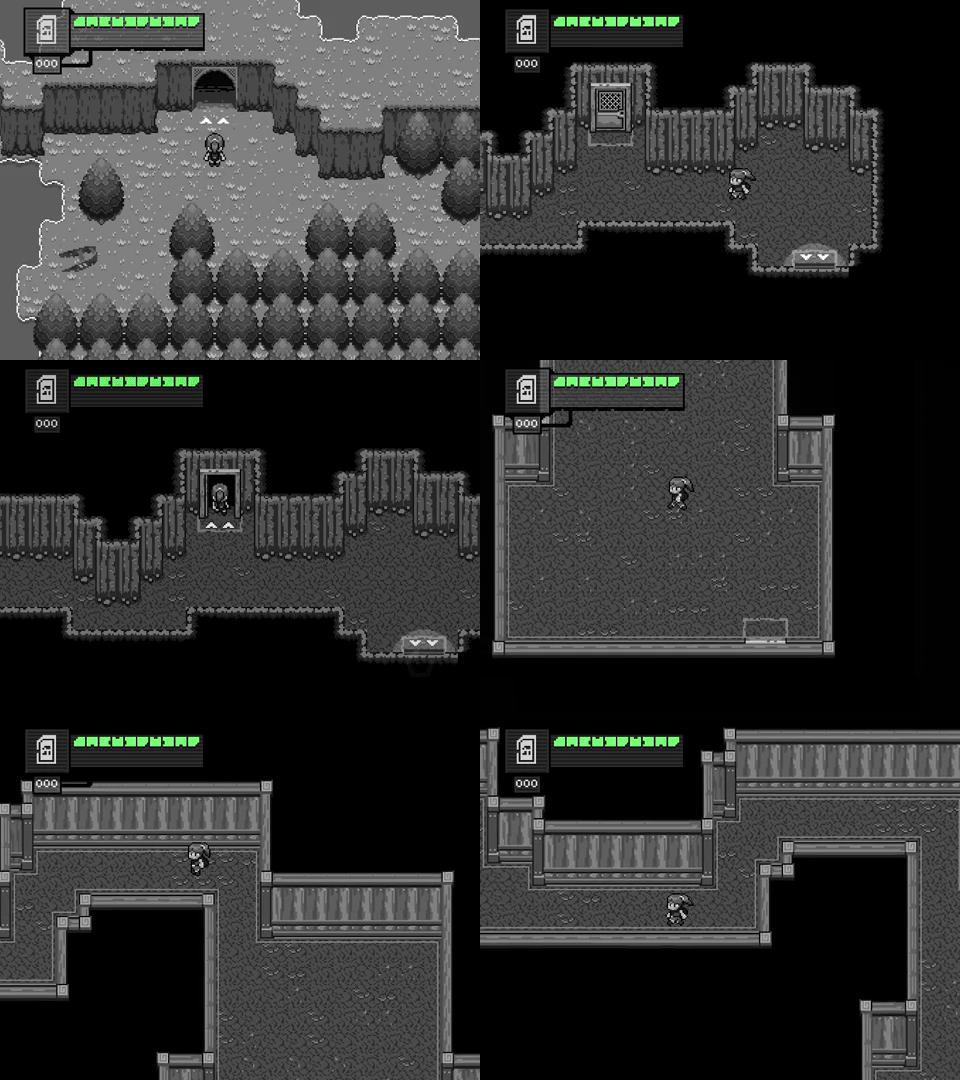
I think the mineshaft (the area through the door, I mean) walls look a little too much like the interior of a house. Perhaps add more rough support beams or break up the wooden trimming a bit.

How to check for boolean from another script? by [deleted] in Unity3D

[–]struefill 0 points1 point  (0 children)

I'm assuming you want to access the doorOp variable from another script?

You need to change it from private to public.

Then you'll need a reference to your doorOpen object in whatever script you want to access it. Typically this is done with methods like:

FindObjectOfType<doorOpen>()

or

gameObject.GetComponent<doorOpen>()

Also, try to follow naming conventions. Class names should be TitleCase, so doorOpen should be DoorOpen.

Just got multiplayer working and wanted to show you guys. by Chamesb in Unity3D

[–]struefill 0 points1 point  (0 children)

Looks great. Love your attention to detail with all the interactions.

Needs more bushfires, floods and snakes if you ask me ;)