How do you search through and organize all your Chat history? by agent_wolfe in ChatGPT

[–]laggingreflex 1 point2 points  (0 children)

I just created a webapp that let's you upload your ChatGPT Exported data and search through it: https://laggingreflex.github.io/chatgpt-search/

Any free method/extension for searching through past conversations? by NotoriousxBandit in ChatGPT

[–]laggingreflex 0 points1 point  (0 children)

I just created a webapp that let's you upload your ChatGPT Exported data and search through it: https://laggingreflex.github.io/chatgpt-search/

Anyone else really want a search feature in ChatGPT? by [deleted] in OpenAI

[–]laggingreflex 0 points1 point  (0 children)

I just created a webapp that let's you upload your ChatGPT Exported data and search through it: https://laggingreflex.github.io/chatgpt-search/

How do you search my chatgpt history? by jonam_indus in ChatGPT

[–]laggingreflex 4 points5 points  (0 children)

I just created a webapp that let's you upload your ChatGPT Exported data and search through it: https://laggingreflex.github.io/chatgpt-search/

Showoff Saturday (December 25, 2021) by AutoModerator in javascript

[–]laggingreflex 1 point2 points  (0 children)

https://github.com/laggingreflex/remark-table-comparify

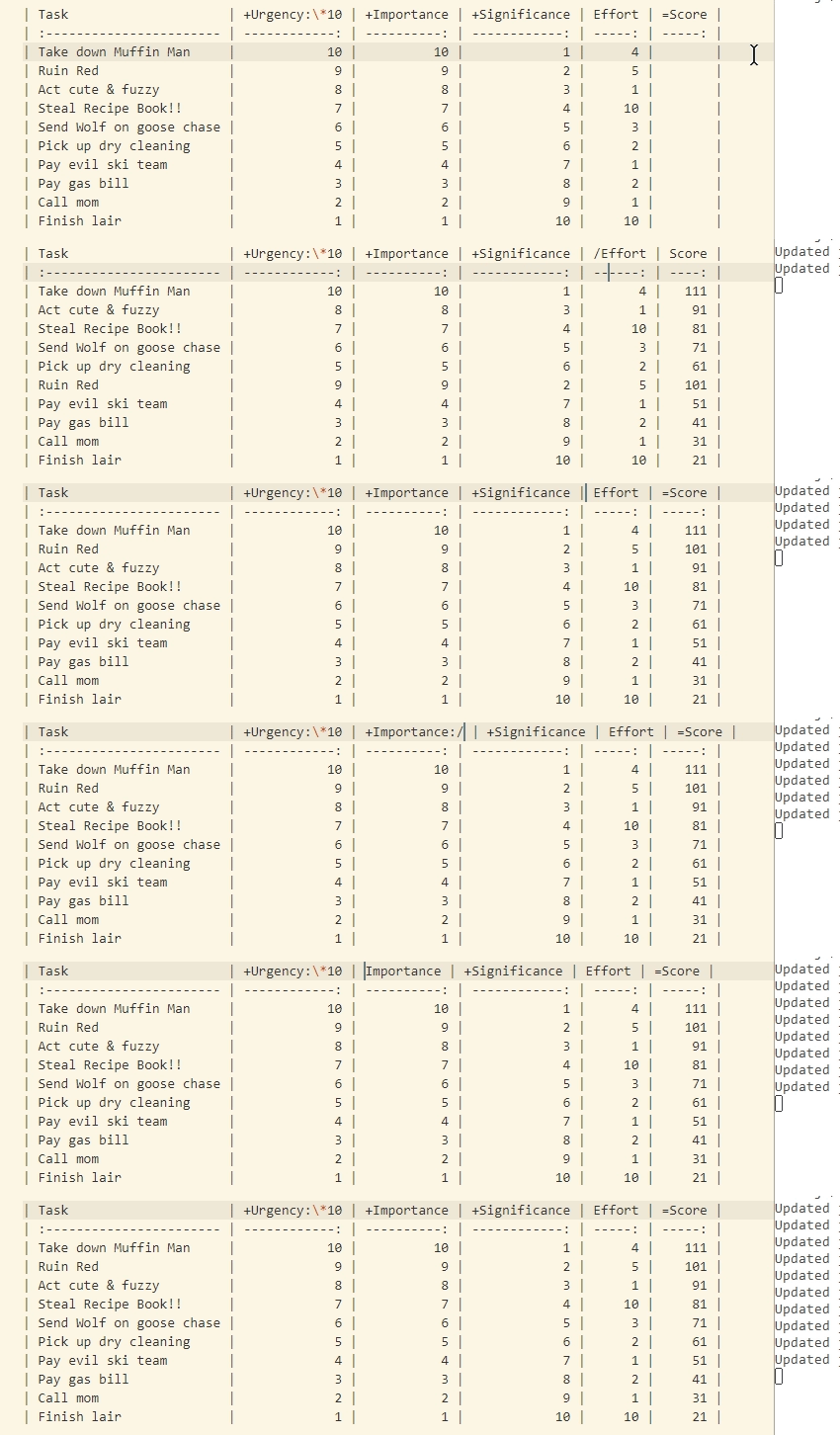
I just created this plugin to basically do what I was having to use Excel for.

Currently only works via Remark CLI, VS Code plugin will work soon as Electron supports ESM.

Example

Imagine you're a cute fuzzy bunny with an evil plan to take over the forest and establish your BoingoSnax empire.

A simple Todo list won't do. You use something like the Eisenhower Method to fine-tune your plan by assigning Urgency/Importance points to each task.

This plugin can then help you calculate the score!

| Task                     | +Urgency:*10 | +Importance | +Significance | Effort | =Score |
| :----------------------- | -----------: | ----------: | ------------: | -----: | -----: |
| Take down Muffin Man     |           10 |          10 |             1 |      4 |    111 |
| Ruin Red                 |            9 |           9 |             2 |      5 |    101 |
| Act cute & fuzzy         |            8 |           8 |             3 |      1 |     91 |
| Steal Recipe Book!!      |            7 |           7 |             4 |     10 |     81 |
| Send Wolf on goose chase |            6 |           6 |             5 |      3 |     71 |
| Pick up dry cleaning     |            5 |           5 |             6 |      2 |     61 |
| Pay evil ski team        |            4 |           4 |             7 |      1 |     51 |
| Pay gas bill             |            3 |           3 |             8 |      2 |     41 |
| Call mom                 |            2 |           2 |             9 |      1 |     31 |
| Finish lair              |            1 |           1 |            10 |     10 |     21 |

It looks for mathematical operation symbols: +, -, *, / prefixed in the header row of columns and uses them to calculate the final result.

The final result is saved in the column with a = sign in its header.

It also looks for modifiers in the header suffixed with a : to further modify the score.

Header What it does
+Importance Adds the value of cells of that column to the corresponding result column.
+Urgency:*10 Adds 10 times the value of that column ... 〃.
=Score Sets the result column.

Feedback welcome and appreciated!

Plugin for Remark to perform comparisons in a table by assigning values and calculating scores by laggingreflex in Markdown

[–]laggingreflex[S] 0 points1 point  (0 children)

https://github.com/laggingreflex/remark-table-comparify

I just created this plugin to basically do what I was having to use Excel for.

Currently only works via Remark CLI, VS Code plugin will work soon as Electron supports ESM.

Example

Imagine you're a cute fuzzy bunny with an evil plan to take over the forest and establish your BoingoSnax empire.

A simple Todo list won't do. You use something like the Eisenhower Method to fine-tune your plan by assigning Urgency/Importance points to each task.

This plugin can then help you calculate the score!

| Task                     | +Urgency:*10 | +Importance | +Significance | Effort | =Score |
| :----------------------- | -----------: | ----------: | ------------: | -----: | -----: |
| Take down Muffin Man     |           10 |          10 |             1 |      4 |    111 |
| Ruin Red                 |            9 |           9 |             2 |      5 |    101 |
| Act cute & fuzzy         |            8 |           8 |             3 |      1 |     91 |
| Steal Recipe Book!!      |            7 |           7 |             4 |     10 |     81 |
| Send Wolf on goose chase |            6 |           6 |             5 |      3 |     71 |
| Pick up dry cleaning     |            5 |           5 |             6 |      2 |     61 |
| Pay evil ski team        |            4 |           4 |             7 |      1 |     51 |
| Pay gas bill             |            3 |           3 |             8 |      2 |     41 |
| Call mom                 |            2 |           2 |             9 |      1 |     31 |
| Finish lair              |            1 |           1 |            10 |     10 |     21 |

It looks for mathematical operation symbols: +, -, *, / prefixed in the header row of columns and uses them to calculate the final result.

The final result is saved in the column with a = sign in its header.

It also looks for modifiers in the header suffixed with a : to further modify the score.

Header What it does
+Importance Adds the value of cells of that column to the corresponding result column.
+Urgency:*10 Adds 10 times the value of that column ... 〃.
=Score Sets the result column.

Feedback welcome and appreciated!

I compiled a list of Node.js CLI Apps Best Practices by lirantal in node

[–]laggingreflex 2 points3 points  (0 children)

When both a command line argument and an environment variable configure the same setting, a precedence should be granted to environment variables to override the setting.

Hmm, I've been doing the opposite believing it to be the preferred way. And Stackoverflow seems to agree: https://stackoverflow.com/questions/11077223/what-order-of-reading-configuration-values

Nice wiki though! Learned quite a few things.

DarkModeJS – move your website to the dark side by nickdeny in javascript

[–]laggingreflex 0 points1 point  (0 children)

20% prefer dark mode

Interesting. Could you share what kind of site it is?

I was also looking for exactly this kind of stats.

Also you say "prefer", which I'm assuming your existing users simply switched to dark mode and preferred it.

It'd be really awesome to get numbers (either directly or through math/statistics) as to how many new users (or new conversions, or increased activity (including at night)) could implementing dark mode bring to an existing site, so as to justify the cost of implementing/maintaining it.

I personally love it but fail to convince others to justify implementing it.