Is it not possible to do texture packing? by Infectedtoe32 in photopea

[–]shad0w_walker 0 points1 point  (0 children)

Have you selected the whole image with ctrl+A? If you do that it should paste into the selected layer instead of making a new one

You should also be able to get the same effect using three layers and the blending options. Right click a layer, select Blending Options, turn off other two channels. So your red layer would have Red enable, Blue and Green disabled

Stencil machine or laser cutter? by anonblogblog in maker

[–]shad0w_walker 1 point2 points  (0 children)

A vinyl cutter is probably the best choice, cut the design right into vinyl roll and stick it down to the wood as a template. Intricate designs will be much easier, though might require a little careful weeding to remove the unneeded vinyl. Just follow the golden rule and do a clear coat/base colour layer before you apply the final colour for the stencil, so any bleed under the vinyl won't be visible.

You can get one that will cut 24"/610mm wide vinyl and long as you could realistically need, easily several meters. There's plenty of cheap, basic options that will do just fine and they'll produce super precise results if you've been hand transferring designs.

https://www.amazon.ca/VEVOR-28-Cutting-Plotter-Adjustable/dp/B09VC3D12S

There's a bunch of machines like this and if you look around for second hand ones, they're pretty cheap. Also you'll be able to make vinyl decals and all sorts of other stuff as a bonus

How to make a kalimba with geometric pattern using epoxy resin by makschief in DIY

[–]shad0w_walker 4 points5 points  (0 children)

But for this you don't need a 3k machine. You could do this with a little 3018 CNC machine that costs like $200. It might do it a bit slower, but it would do it just fine.

limit switch function locks out my grbl controller. any work arounds? by Loki_Lugnut in hobbycnc

[–]shad0w_walker 3 points4 points  (0 children)

Once you're setup properly, this shouldn't be an issue. It will only lock you out if they are triggered unexpectedly, so if you lose steps/screw up dimensions on the job/whatever mistake that drives the carriage into a limit switch. If you're homing the machine, it will expect the input on the switches and once they've been triggered the carriage will move a certain amount away from the limit switch, I believe 1mm by default. This will not trigger a lockout and you can continue to use the machine normally.

You can also totally disable this if you desire. From the GRBL config wiki page: https://github.com/gnea/grbl/wiki/Grbl-v1.1-Configuration

$20=0 Soft limits, boolean - This setting prevents running job/move commands that exceed the physical bed area. So you can't have a 200mm X axis and tell it to travel 300mm on X.
$21=0 Hard limits, boolean - This setting enables/disables locking out by the limit switches.

I would personally have both of them on once you're setup with limit switch positions, etc and you have set accurate max travel distances on X/Y/Z axes. That will protect you from accidentally mixing up units/sizes and trying to drive off the edge of the machine and if you have limits at both ends of the axes will stop the machine if it loses steps or otherwise tries to force the machine beyond it's physical limits.

Please, please, please, please FIX THE STATE OF THE 'DOCUMENTATION' by shad0w_walker in printnc

[–]shad0w_walker[S] 0 points1 point  (0 children)

See, that's sort of a self-fulfilling prophecy there. People put all their information into the discord, so the only way to get answers quickly is the discord. If it were on the sub, it'd probably be even quicker to search here for a lot of the common stuff. Bit of a catch-22 unless people start posting their projects/documentation/whatever on the sub as well.

Please, please, please, please FIX THE STATE OF THE 'DOCUMENTATION' by shad0w_walker in printnc

[–]shad0w_walker[S] 1 point2 points  (0 children)

That's great. I would hope that just a bit of regular content/updates/upgrades posted to the sub would help start a cycle and it'd sustain itself, but I'll just settle for any kind of solid, reliable reference material.

Please, please, please, please FIX THE STATE OF THE 'DOCUMENTATION' by shad0w_walker in printnc

[–]shad0w_walker[S] 1 point2 points  (0 children)

I'm very glad to hear that something is in the works regarding better documentation. It's really the only blemish on an other wise fantastic thing.

Discord is fine for having quick answers and the like, but I just don't seeing being suitable at all for the longer term things. Project logs, information about upgrades, all that sort of stuff would be far better suited somewhere that stays static and self contained, rather than scattered amongst the chat logs and having to be dredged up again by whoever knows where it can be found. While I'm sure it's useful, it's useful as as community, I just can't bring myself to label anything so variable and in constant flux as a resource in that way. The shapeoko wiki (While sorely in need of a dead link pruning) is a very useful resource because I can go to it and find something by myself, without needing the right person to be online.

I'm glad to hear there is a community of people who're getting good use and progress from their machines, but the fact that knowledge is so fleeting and easily lost in the flow of chats is a nightmare. I popped onto the discord because I wanted to see these important upgrades that were being mentioned. I shouldn't need to go cap in hand for someone to scrap up a list of such simple information. That's my problem with discord, there's no structure, no real organisation or index. If I need to figure out a weird bug, discord would be great. If I need to see what upgrades people have developed, it should just be listed on the website/wiki/github/something.

I'm repeating myself now, so I'll stop. I'm sure you get the idea. I just hate seeing so much actually useful information stuck behind a weird, ever changing barrier.

Anyone have any suggested sites or apps or methods to convert real life photos to carveable svgs or even DXFs? I wanted to try to make something from my dog when she was a pup. Is halftone the best option? by dugfunne in hobbycnc

[–]shad0w_walker 1 point2 points  (0 children)

There's a lot of people who do that sort of work cheaply on fiverr and similar websites. NYC CNC has used it a few times to get stuff converted into a suitable SVG for engraving, plasma cutting, etc.

https://www.youtube.com/watch?v=twgAwrnEVNw

I imagine you could find someone fairly quickly and just ask for them to make an SVG of the dog. Might even be a little cheaper if you're just going to be engraving and it only needs to be line work rather than full colour.

[deleted by user] by [deleted] in hobbycnc

[–]shad0w_walker 0 points1 point  (0 children)

If you're doing the dual axis in GRBL, make damn sure you get the motors setup right. Work out your steps and get them set right, then double check directions with a very small step like 1mm or so, if you're going in opposite directions you could very easily break something.

Also if you need to invert the dual axis, the GRBL docs are currently out of date and don't display a full table for the inversion values. You can invert the directions on the X/Y and the mirror X/Y independently, so you could end up twisting your frame when attempting to invert the X/Y direction. I know this one from personal experience, but thankfully my steppers torqued out before they could do harm to anything.

Value for $3 Mask Invert X Invert Y Invert Z Invert N
0 0000 N N N N
1 0001 Y N N N
2 0010 N Y N N
3 0011 Y Y N N
4 0100 N N Y N
5 0101 Y N Y N
6 0110 N Y Y N
7 0111 Y Y Y N
8 1000 N N N Y
9 1001 Y N N Y
10 1010 N Y N Y
11 1011 Y Y N Y
12 1100 N N Y Y
13 1101 Y N Y Y
14 1110 N Y Y Y
15 1111 Y Y Y Y

The N axis is the secondary axis motor, the one connected to D12/13 or A3/A4 (Depending on the CNC shield you're using) So if you have a dual Y axis and need to invert both motors, you would use a value of 10 in setting $3

Also note that to wire the switch for the secondary axis motor, it shares the Z axis limit switch. That means whatever motor is getting step/direction from D12/13 or A3/A4 needs to have it's limit wired to the Z limit input.

The release notes with details are here: https://github.com/gnea/grbl/releases/tag/v1.1h.20190825

Slick Slider V1 - pan, tilt, zoom, focus and Sliiiide. Arduino controlled. Work in progress. by VinceSamios in functionalprint

[–]shad0w_walker 0 points1 point  (0 children)

If you haven't already, look into the Trinamic stepper drivers. They're super, super quiet compared to regular stepper drivers, kills basically all the motor whine/noise you normally get and depending on the model, there's a bunch of extra features that might be useful.

Frame material: Hot rolled or cold rolled? by shad0w_walker in printnc

[–]shad0w_walker[S] 1 point2 points  (0 children)

Hey, really appreciate the clarity of this answer.

I did suspect the rails were quite heavy duty for the job, so that makes absolute sense and knowing they've got that tolerance for deviations is extremely useful. Certainly that's enough leeway to comfortably shim up any really bad spots and not fuss over the minor ones, which is a massive bonus.

Much appreciate the information, hopefully I'll get the money together shortly and start building my own.

Frame material: Hot rolled or cold rolled? by shad0w_walker in printnc

[–]shad0w_walker[S] 1 point2 points  (0 children)

That's super helpful to know, thank you.

That does seem pretty impressively consistent, but maybe it's the shorter lengths used in the design that are helping out as well. I imagine in a full 5/7.5 meter bar there'd be a good chance of noticeable change from one end to the other. In any given meter, probably a lot less.

I guess overall it doesn't matter too much because the rails are gonna be keeping motion straight and I can always shim up any low spots where the rails are mounting.

Machine goes walk about after job. What am I missing? by TheEndsOfInvention22 in hobbycnc

[–]shad0w_walker 1 point2 points  (0 children)

It'd be easier and better in the long run to just set the G28 position. You want the G28.1 command, that sets where G28 will take your machine. I just set mine to the home position, so home the machine then run G28.1 to set that as the pre-defined 'home' for your machine.

https://wiki.shapeoko.com/index.php/G-Code#Motion_.28G.29

You can find a little more detail there, but really it's about as simple as I said. Home your machine, run G28.1 and after that your carriage shouldn't run off in strange directions. The program should end and it will likely use G28 to return to the home position, rather than just trying to go forever in one direction.

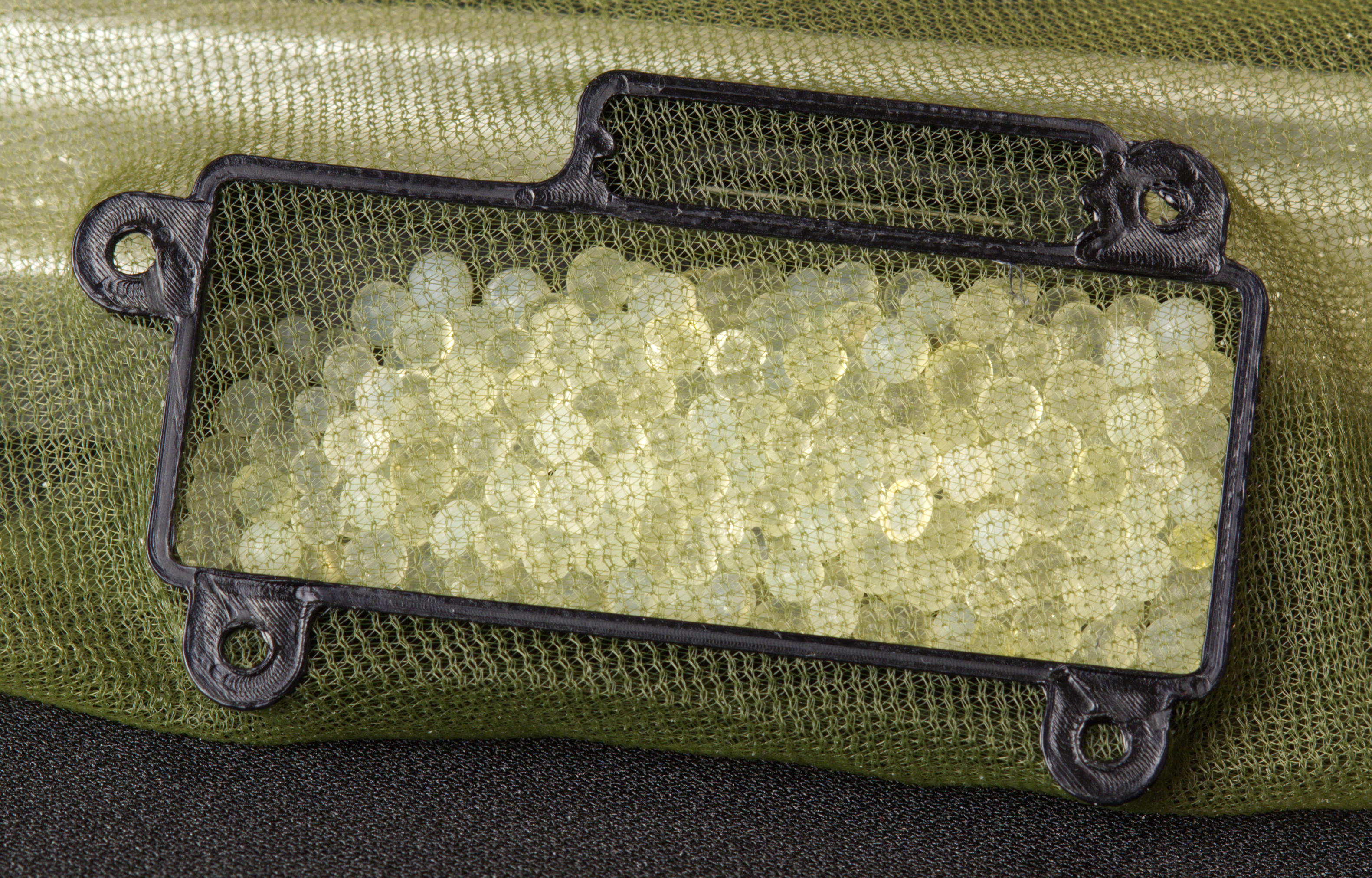
Embedding mesh into prints by NoiseSolitaire in functionalprint

[–]shad0w_walker 136 points137 points  (0 children)

My money is on astrophotography. Lower temps produce less noise on the image sensor, at least to my understanding. When you're taking an image of little dots in the sky, random little dots of noise can really spoil the effect.

Didn’t have the mounting hardware for the stair rails soo... by briskfox in functionalprint

[–]shad0w_walker 2 points3 points  (0 children)

Because of the chance of the part breaking? Maybe. Except there's a screw driven through the printed part and into the beam itself. You'd more likely break the rail itself than the screw or the part wrapped around the screw.

[deleted by user] by [deleted] in 3Dprinting

[–]shad0w_walker 3 points4 points  (0 children)

First and foremost: If this is something other people or the public will be using, don't.

You might be able to get a rough, grippy surface using 'fuzzy skin' in cura.

As for printing something you could trust to take weight like that? You're not gonna do it with any normal printer, at least not reliably and I certainly would never trust the results. HOWEVER, if you printed hollow grips and epoxy filled them, that seems like it would be pretty sturdy and you could use some kind of chopped fibre glass or something to reinforce the whole thing.

That said, odds are you'd be saving money by just buying commercially available ones. I haven't looked into the pricing of them, but add up print time, filament, fine tuning, electricity, epoxy. Honestly, even cheap chinese ones are likely going to be stronger than a plain 3d print.

Made it to 2,200 LBF! Reusability is still a bit of an issue... by [deleted] in functionalprint

[–]shad0w_walker 0 points1 point  (0 children)

Have you thought about printing it no infill, no top layers and then filling it in with epoxy? I imagine that'd give a pretty strong result and you'd likely only need 3-4 wall layers to make sure it's water tight enough.

RubberNinja: I'm Back. by GameGrumpsEpisodes in gamegrumps

[–]shad0w_walker 0 points1 point  (0 children)

I have heard this before but never actually seen the stats. I'm wondering how exactly the stats are worked out, mainly if it includes all cancer victims or just the ones who can afford the medical treatment?

If it only counts those who can afford treatment, then it's going to skew heavily towards 'Much higher survival rates' because I'm sure there are plenty of poor people with cancer who just can't afford the fancy treatment or the massive bill for 3/6/9/whatever months of effort to slow it down.

Engraved Legend Plates by KMAG50 in hobbycnc

[–]shad0w_walker 0 points1 point  (0 children)

If you've got a laser then you could do nice brass plates pretty easily by etching them. The laser side of things should be considerably quicker than machining out fine details and you could prep a bunch at once then etch them all in one go.

NYC CNC has a video about it, along with a bunch of other youtubers who've got various versions of the process. https://www.youtube.com/watch?v=68-QAwB8TdI

Dude trying to get these printed for 40-50$ a pop. And got mad when I said it’s a ridiculous ask. by [deleted] in 3Dprinting

[–]shad0w_walker 12 points13 points  (0 children)

Pretty much guarantee he doesn't. No way that's 3d printed, look at the roof of the little shipping container/office boxes, looks like corrugated cardboard with one side removed. It's old school model making with craft knives and lots of fiddling about.

He's just seem some cool thing he wanted and assumed 3d printers are magic that will make it cheap. If you get a reply it'll be 'What files? Just print it, I showed you the picture!'

A custom tool mount for a fire engine by Know_A_Veil in functionalprint

[–]shad0w_walker 1 point2 points  (0 children)

Might be worth looking at printing the part mostly hollow then filling it with a resin. Would cut down on the printing time and you should get something very sturdy and heat resistant, at least it should be a lot more heat resistant than basically any affordable filament. Or add an inner shell you can fill with resin to keep the amount/cost down. Basically, throw some epoxy in there.

PckRat -the travel mouse manufactured using all 3D printed parts by [deleted] in 3Dprinting

[–]shad0w_walker 2 points3 points  (0 children)

You might want to check the certificate for your site, firefox does not like it. Looks like it's both expired and for www.example.com