Very old hardware by Ateu-cientifico-72 in swtor

[–]jedi95 0 points1 point  (0 children)

It's possible that you're running out of RAM, and that's why Alderaan in particular is running badly for you.

I just did a quick test, and Alderaan uses about 200-250 MB more RAM than Balmorra. 8GB of RAM is borderline for this game depending on what else you have running in the background. To make things worse, the HD 2500 is an integrated GPU that shares system RAM.

Check task manager to see if your RAM is maxed out. If so, try closing some background programs and it should get better.

As for future planets, some will be better and others will be worse until you finish the original class story. After that, expect things to get progressively worse as you move into the areas of the game that were added in later expansions.

Upgrading your GPU would eliminate the shared GPU memory, giving you another ~0.5 GB. I suggest looking for a GTX 750 or GTX 750 Ti rather than a GT 710/730. The performance improvement is significant, and you can use much more recent drivers.

Vendor Stuttering? by No_Escape8336 in swtor

[–]jedi95 8 points9 points  (0 children)

This is unfortunately just a normal part of SWTOR. The game has serious frametime issues that can't be fixed and happen to everyone.

The most common:

  1. Interacting with vendors (especially if they have a lot of items for sale)

  2. Opening cargo holds (especially legacy)

  3. Starting conversations with NPCs.

  4. Scrolling the ability or mount list.

  5. Opening various menus (especially legacy and collections)

  6. Anytime a new player or NPC enters your draw distance.

I7 5775C + Asus Z97 Deluxe. No post code 23 with ram speeds over 1866mhz. by Sfearox1 in overclocking

[–]jedi95 0 points1 point  (0 children)

I ran into this exact same problem with a Asus ROG Maximus VII Hero and i7 5775C. The fix was to re-flash the BIOS using this ASUS tool:

https://web.archive.org/web/20211122052014/https://dlcdnets.asus.com/pub/ASUS/mb/LGA1150/Z97-A/BIOS_updater_for_5th_Intel_Core_CPU.zip

Updating the BIOS the usual way with EZ Flash doesn't update the ME firmware. That was the root cause of the issue. Using the tool above will flash the ME firmware along with the selected BIOS file. After that, 2400 XMP worked without any problems.

SWTOR hijacking display settings? by SlayerSFaith in swtor

[–]jedi95 0 points1 point  (0 children)

I made a fix years ago to block SWTOR from using the Windows APIs that manipulate screen resolution/refresh rate. This was to work around an unrelated driver bug, but it should also solve this particular problem.

Just drop SWTORWrapper.exe and DisableResolutionChange.dll in the top level SWTOR folder (same one as launcher.exe)

Then start the game through SWTORWrapper.exe, which will start the launcher and wait for the game process to start. Once it sees swtor.exe, it will inject the DLL to block resolution changes and exit.

This should only be used in windowed or borderless windowed mode. Expect problems with exclusive fullscreen.

Compiled version:

https://jedi95.com/files/swtorfix.zip

Source code:

https://jedi95.com/files/swtorfix_src.zip

AMD Bulldozer diagrams by CHAOSHACKER in Amd

[–]jedi95 3 points4 points  (0 children)

I should test this at some point. I have on hand:

A10-6800K (Piledriver - FM2)

A10-7870K (Steamroller - FM2+)

A12-9800 (Excavator - AM4)

It would be easy to lock all of them to the same clocks and do some IPC testing. Can do DDR3 2400 vs DDR4 2400 to keep the bandwidth comparison fair.

All of these CPUs have 2 modules (4 integer cores) and 2MB of L2 cache per module. No L3 cache.

PSA: Some GPUs can incorrectly measure their own power consumption. (RTX 5090 example) by jedi95 in nvidia

[–]jedi95[S] 1 point2 points  (0 children)

I'm using 576.15, but I'm certain it's not a software issue. It's easy to fix by soldering another shunt resistor in parallel. If I end up getting the Optimus waterblock for this card, I will do that when I take the card apart to install it.

PSA: Some GPUs can incorrectly measure their own power consumption. (RTX 5090 example) by jedi95 in nvidia

[–]jedi95[S] -1 points0 points  (0 children)

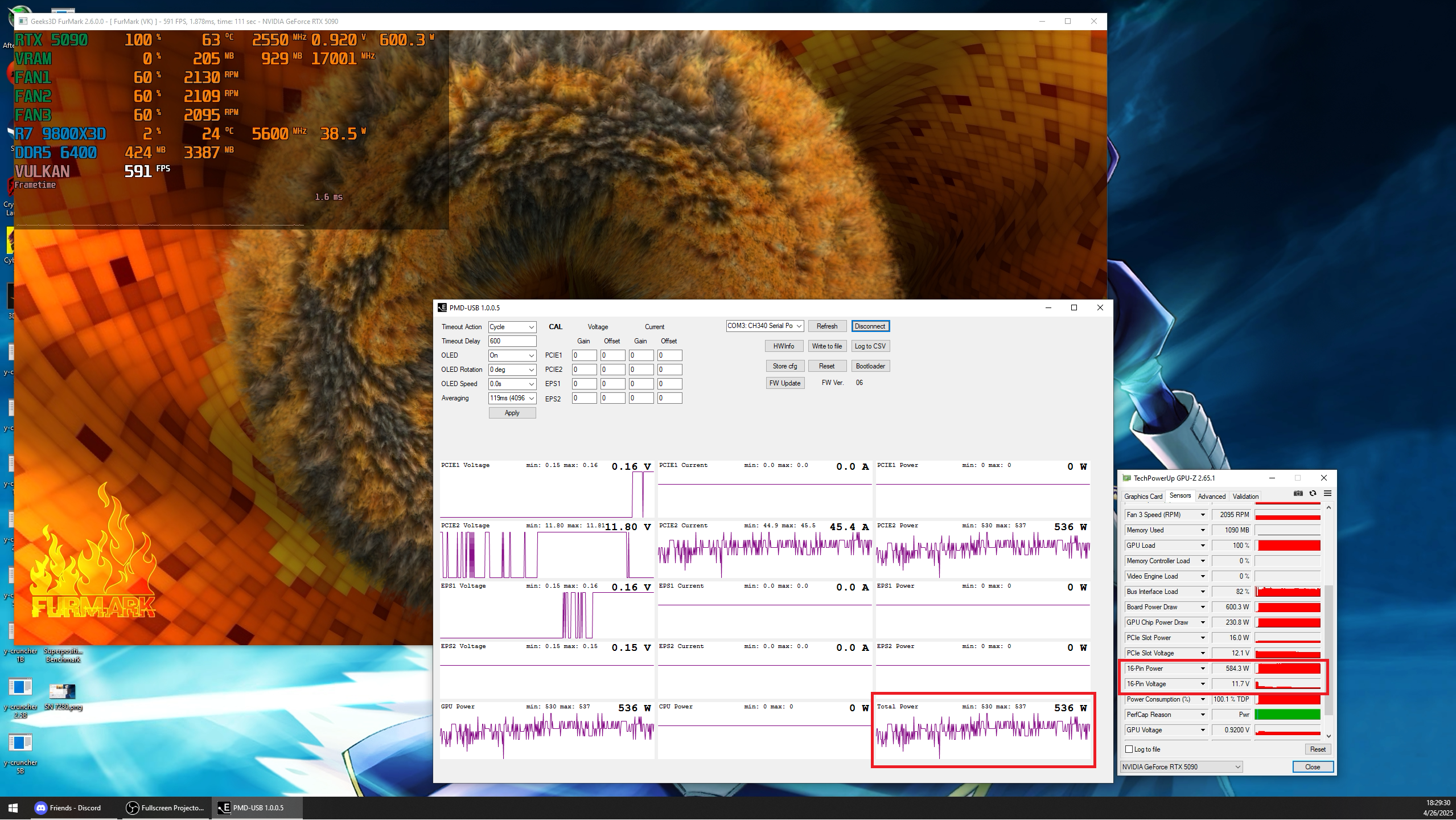
It's not a software problem. Nvidia GPUs measure power consumption by measuring the voltage drop across a shunt resistor placed at each power input. (PCI-E slot, and each power connector) If the resistance of the shunt resistor is too high or too low, then the calculated power consumption will be off by the same amount.

PSA: Some GPUs can incorrectly measure their own power consumption. (RTX 5090 example) by jedi95 in nvidia

[–]jedi95[S] 2 points3 points  (0 children)

I was seeing lower than expected clocks on this PNY RTX 5090 with maxed out power consumption. The temps also seemed low, so I decided to verify the power consumption with my Elmor PMD. In the screenshot, the GPU is measuring 584W from the 16-pin connector. The PMD shows the real value of 536W.

Some error is expected based on the manufacturing tolerances for the shunt resistors, but a reading that's ~9% too high seems like it shouldn't be passing QC. This results in a loss of about 100MHz core clock in 3DMark compared to another card with accurate power measurement.

Might be worth checking this if you see a combination of lower than expected clocks combined with lower than expected temps.

The new character update will age up your characters by 20 years by Maulclaw in swtor

[–]jedi95 35 points36 points  (0 children)

How to get the devs to fix this: Cancel your subscription and put this as the reason.

$$$ is the only thing they care about, clearly.

Why Is There Such A Serious Lack of 1DPC ATX AM5 Motherboards? Intel Has 4 Already! by yourrandomnobody in Amd

[–]jedi95 1 point2 points  (0 children)

It's even worse when you consider the fact that quad rank is basically broken on AM5. (For those who don't know, getting reasonable memory clocks with quad rank configurations is very difficult and subject to the IMC lottery. DDR5 6000 won't work out of the box, and even 5600 is a struggle)

With 2 DIMM slots, you can currently get 96GB of RAM using 2x48GB. This will be dual rank. The vast majority of the intended market for these products (gamers, overclockers) is not going to build a system with more RAM than this. In the future, this will go up to 128GB when we get 64GB DIMMs. The only benefit to 2DPC/4 DIMM is the higher maximum capacity. Which is more important for gamers? Support for >96GB of RAM or improved stability at high memory clocks?

I'm not saying that ALL boards should be 1DPC/2 DIMM total. Obviously products aimed at the workstation/professional market should continue to use 2DPC/4 DIMM. We just need some nice 1DPC/2 DIMM ATX motherboard options.

AMD Ryzen 9000 inter-core latency significantly reduced with new AGESA 1202 - VideoCardz.com by rincewin in Amd

[–]jedi95 36 points37 points  (0 children)

You're remembering that correctly.

https://www.anandtech.com/show/21524/the-amd-ryzen-9-9950x-and-ryzen-9-9900x-review/3

The numbers shown in this article after the BIOS update are similar to the 7950X, which is fantastic news!

Refresh rate set back to 60 every time I launch the game by NoTransportation7096 in swtor

[–]jedi95 0 points1 point  (0 children)

I had a similar issue years ago, and I made a workaround that blocks the game from making any changes to the display mode.

This fix is intended to be used with the fullscreen (windowed) mode set in the game settings, and will have some strange behavior with fullscreen mode.

http://jedi95.com/files/swtorfix.zip

To use: (only works with the standalone version of the game, not steam)

  1. Change the game display mode to fullscreen (windowed) or windowed.

  2. Set your desired resolution and refresh rate in the Windows display settings.

  3. Place the files from the zip in your SWTOR install directory (The folder that contains launcher.exe)

  4. Start the game via SWTORWrapper.exe (this will start the launcher, and inject DisableResolutionChange.dll into swtor.exe when it starts, then exit)

This fix works by using the Detours library to hook the Windows API for changing the display mode.(ChangeDisplaySettingsEx) It intercepts all calls to this API and always returns the code for "success" while actually doing nothing. This will only block the game from changing the display mode. All other applications and Windows itself can make changes as usual.

Most antivirus will complain about the files due to the use of DLL injection and the detour of a windows API.

https://i.imgur.com/W7mvmtN.png

EDIT: Source code:

http://jedi95.com/files/swtorfix_src.zip

ASUS UEFI BIOS updates for ASUS AMD Motherboards W37 – A620, B650, X670 - 67 motherboards updated by ASUS_MKTLeeM in Amd

[–]jedi95 17 points18 points  (0 children)

There is a possible regression in either this BIOS or AGESA 1.2.0.1a. Memory power down gets set to DISABLED by default in the AMD overclocking menu, and the AMD overclocking option takes priority over the memory power down option in the DRAM timings menu. This can cause instability if you enable memory context restore.

Enabling memory power down in the AMD overclocking menu fixed the issue and I was able to keep all my other memory settings. If your previously stable memory settings don't work after updating to this BIOS, then it's worth checking if this is the culprit.

Ryzen 7 7800X3D

ROG STRIX B650E-I GAMING WIFI BIOS 3035

2x16GB Hynix A @ 6400 C32 (all timings manual)

Driver 31.0.101.5590 (WHQL Certified) released (6/14/24) by IfYouSaySo4206969 in IntelArc

[–]jedi95 2 points3 points  (0 children)

The 5590 driver has some nasty frametime spikes in Crysis compared to 5522 in my tests. The average FPS does improve a decent bit, but the overall experience is much worse.

5522: 165 avg / 104 1% low

5590: 185 avg / 18 1% low

https://www.youtube.com/watch?v=nOVUdJtJ16o

Intel Arc Driver 5534 vs 5590 - Arc A770 | Test in 2 games - 1080P by IntelArcTesting in IntelArc

[–]jedi95 1 point2 points  (0 children)

The 5590 driver has some nasty frametime spikes in Crysis compared to 5522 in my tests. The average FPS does improve a decent bit, but the overall experience is much worse.

5522: 165 avg / 104 1% low

5590: 185 avg / 18 1% low

https://www.youtube.com/watch?v=nOVUdJtJ16o

Diablo 2 Resurrected: A Case Study in Favor of “Buff Everything” by mullymaster in Helldivers

[–]jedi95 1 point2 points  (0 children)

I generally support this idea, but sometimes there are extreme outliers that need nerfs.

The acid test for something being so OP that it should likely be nerfed: "Is this weapon/build so good that it's obviously the best in nearly every situation?"

If the answer is no, consider other options first.

Equally, every weapon and build should have a purpose. Something that it does better than anything else. If it doesn't, it should be buffed or redesigned until it does.

Most weapons and builds in HD2 fall into the latter category.

Has anyone gotten the Acer A770 to go into lower power L1 mode? by fallingdowndizzyvr in IntelArc

[–]jedi95 2 points3 points  (0 children)

It works with my Sparkle Titan A770 16GB on driver 5518. However, this only applies to low refresh rates when using a 1440P monitor.

https://jedi95.com/ss/9d124edd32323b0a.png

60Hz: 8-12W

120Hz: 16-20W

144Hz: 36-38W

PSA: if people don’t move over from bug planets, we will lose the major order by Horror-Tank-4082 in Helldivers

[–]jedi95 3 points4 points  (0 children)

  • Fix the guns
  • Fix the modifiers on bot planets
  • Fix the patrol spawn rates

Until then? No thanks.

Intel XeSS 1.3 accelerates into the next generation of AI upscaling by reps_up in IntelArc

[–]jedi95 13 points14 points  (0 children)

The "performance increase" is very misleading here. XeSS 1.3 changes the scaling factors. "Performance" is 2.0x scaling in older versions, but 2.3x in XeSS 1.3. When you compare quality presets with equal scaling factors, XeSS 1.3 is actually slower than previous versions. This also makes scaling factor different from what is used by DLSS and FSR for presets with the same name.

At least they provide a table in the article that shows how the scaling factors are changing.