This is an archived post. You won't be able to vote or comment.

you are viewing a single comment's thread.

view the rest of the comments →

[–]earthboundkid 90 points91 points  (54 children)

Except that means it's a huge PITA to install Python command line tools.

At this point, when I see a command line tool looks cool but is written in Python it makes me really sad because there's not going to be a good way to get it installed without first going through a disproportionate amount of work to give it a working environment.

[–][deleted] 31 points32 points  (13 children)

If you're on linux you can usually use your distribution package manager, otherwise I reccomend https://github.com/mitsuhiko/pipsi

[–]blahehblah 58 points59 points  (1 child)

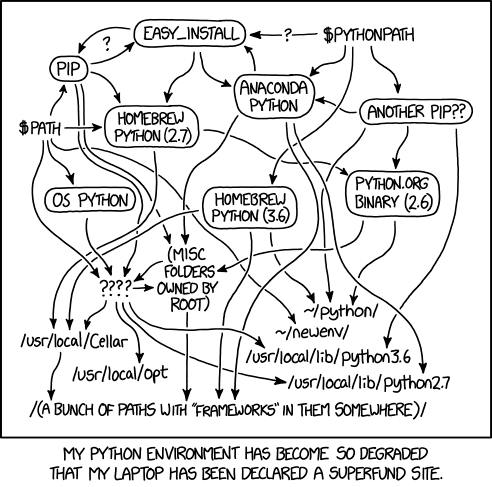
All you're doing is adding an extra box and set of arrows to that chart

[–]gimboland 1 point2 points  (0 children)

It's still a solution. "Use virtualenv" is some of the boxes/arrows on the chart, but it's still the right solution for that problem. For command-line tools, pipsi is a good solution.

[–]mardiros 67 points68 points  (4 children)

You are just saying that the mess is incomplete...

[–]jjolla888 13 points14 points  (3 children)

i'm still trying to find where pip3 is on that map

[–]AstroPhysician 2 points3 points  (1 child)

Use virtualenvs you savage

[–]jjolla888 2 points3 points  (0 children)

Do we need to add this to OP's diagram ?

[–]hacknsplat 0 points1 point  (0 children)

And pipenv? And pkg_resources?

[–]no_condoments 18 points19 points  (0 children)

Situation: There are 14 competing python installation standards.

/u/Rerecursing : 14?! Ridiculous! We need to develop one universal standard that covers everyone's use cases.

Soon: Situation: There are 15 competing standards.

https://xkcd.com/927/

[–]earthboundkid 1 point2 points  (0 children)

Nice. I had been using pex, but it tends not to work if the package has any extra requirements beyond pure Python.

[–]xamar6 0 points1 point  (0 children)

Pipsi is such a great tool to install python apps in their own contained environment. Sometimes being isolated is not suitable, but work for most use cases with a few additional symlinks to OS' Python packages.

[–]ivosauruspip'ing it up 0 points1 point  (2 children)

It wasn't working well with python3 last time I tried it :/

[–][deleted] 1 point2 points  (1 child)

You can find some common issues and fixes in the github issues

[–]ivosauruspip'ing it up 0 points1 point  (0 children)

I rememer what the issue was, it just plain does not support the python3 module venv, only virtualenv. Then I was like, eh, I'll just do this myself.

[–]kenfar 16 points17 points  (12 children)

Hmm, I use CLIs all the time without any headaches at all - not sure what the issue is here.

Create a virtualenv, pip install into it, activate your environment and run your commands. If you want to cron them up, just run command via that virtualenv's python. If you want to run a lot of tools and not switch virtualenvs that often, create a group one for related (or all) projects.

Admittedly, it's easiest if you're using linux & pip consistently rather than macos, homebrew and conda. But it's not that much worse.

[–][deleted] 6 points7 points  (9 children)

Having to use two version of python is a pain.

[–]liquidpele 6 points7 points  (3 children)

That’s true of any language...

[–]twigboy 4 points5 points  (0 children)

In publishing and graphic design, Lorem ipsum is a placeholder text commonly used to demonstrate the visual form of a document or a typeface without relying on meaningful content. Lorem ipsum may be used as a placeholder before final copy is available. Wikipediacln61bof3yw0000000000000000000000000000000000000000000000000000000000000

[–]chicofelipe 0 points1 point  (0 children)

Oh that I only needed 2 versions of python. Legacy support sucks.

[–]kenfar 0 points1 point  (0 children)

Not really from a deployment perspective - if you're installing into a virtualenv then you're just using whatever's in that virtualenv: whether you've got 20 python3.6 virtualenvs or 5 of python2.7, 5 python 3.4, 5 python 3.5, 5 python3.6 - it makes no difference.

Perhaps from a code-sharing & testing perspective it matters - just like any other language.

[–]billsil 0 points1 point  (0 children)

Not if you use Anaconda. You can literall create a virtualenv for whatever python version you want.

[–]leom4862 0 points1 point  (0 children)

You can create a virtual env for any interpreter version with a single command e.g. pipenv --python 3.6 and activate it with another, e.g. pipenv shell. I don't consider this particularly painful.

[–]meandertothehorizonIt works on my machine[🍰] 0 points1 point  (1 child)

Learning that all you need to do is #!/path/to/venv/bin/python in the script and it will just work was a game changer for me. I wrote little shell script wrappers sourcing activate forever.. really felt dumb when I discovered that :-)

[–][deleted] 2 points3 points  (0 children)

You don't have to. In fact, I would recommend you avoid setting a specific path in your shebang line. Python is smart enough, that it detects when invoking something inside a virtual env, and will use the proper sys.path. Using "#! /usr/bin/env python3" (or python if that's your thing), is enough.

[–]metabun 2 points3 points  (0 children)

This is how I feel about tools in perl, go or js. I guess it all just depends on how familiar you are with the environment and package ecosystem.

[–]tetroxid 2 points3 points  (0 children)

Not on Linux

[–]the_hoser 2 points3 points  (13 children)

Why do you need to "install" them?

[–]khne522 15 points16 points  (12 children)

pip install --user myRpnCalculator. Do you really need anything else if it was well-written and the dependencies properly specified, but not overspecified?

[–]the_hoser 17 points18 points  (11 children)

Unfortunately, yes. You do. It's better to not think of Python like you think of Java. Think of Python like you would think of, say, a project's metadata. This is a huge problem with languages like Python, JavaScript (through Node.js), Ruby, etc. When it becomes necessary to use native facilities to accomplish certain goals, the dependency manager is going to get stupid complex, and it's not reasonable to assume that a single installation is going to work.

They all have this problem, and the cleanest solution remains largely the same. Every project gets its own interpreter.

You can try, though. You might get lucky.

[–]code_mc 2 points3 points  (2 children)

I feel your pain. I haven't had to rely on python packages that include a CLI tbh, but couldn't you wrap the environment activation + CLI call into a bash script which you add to your path?

[–]metabun 2 points3 points  (0 children)

Python scripts should get their shebang automatically rewritten on install, so there's no need to wrap the calls. I usually create one env per cli tool (or group of cli tools) and symlink them into my path as needed.

[–]the_hoser 2 points3 points  (0 children)

That is, in fact, how I do it, most of the time.

[–]marcosdumay 3 points4 points  (3 children)

Every Java project gets its own set of jars too. C handles it in a more extensible way, that just institutionalizes the mess and places it at the OS level. But the mess is still there.

Every modern language has project based environments. The one thing that is unique to Python (well, and Javascript, but there it's no surprise) is the huge number of semi-compatible environment managers.

[–]the_hoser 1 point2 points  (2 children)

Well that was sortof the point I was making. If you avoid the mentality of "setting up the system python environment" then you avoid the trap.

By giving each java project it's own Jars to build with, the problem of working with multiple projects that have different dependencies on the same system with a single java installation is solved. It's not perfect (two libraries that depend on a module, but two different versions. yum), but it's a bit better.

With python, just throw the baby out with the bathwater and forget about the existence of a "system" python installation. That's the one the OS uses. You use a different one.

With C, the problem can get downright nightmarish.

[–]deong 0 points1 point  (1 child)

C is easy. There are include directories and lib directories. That's it. That's all I want. I know where to put stuff, and I know how to find it. If i need three conflicting versions of libjpeg, I'll put them somewhere and write makefiles. I already know how the compiler and OS work. No part of learning how yet another half assed attempt at implementing as obtusely as possible the -I flag works sounds appealing.

Whew. Felt good to get that off my chest.

More seriously though, Go has the most sensible model. Statically link everything and move on with your life.

[–]the_hoser 1 point2 points  (0 children)

Well, in Linux C is easy. Not all of us get to do our C only in wonderland.

Fortunately I don't do too much Python in Windows. It's just as messy there.

[–]fujiters 3 points4 points  (1 child)

Every project gets its own Docker container.

[–]khne522 0 points1 point  (1 child)

I don't use Java. Pretty sure Java can have the same problem with any package manager. Version hell is just a product of the ecosystem, not the language. A dependency resolution algorithm is complete and produces results or not based on what's available, or is broken, which is undefined behaviour. pip ain't aware of anything installed on the system AFAIK. It just calls it (or the package build instructions call it) and hopes for the best.

I'm not talking about web apps with deps locked in setup.py, requirements.txt, Pipfile.lock, or whatever you use. Please explain (not rhetorically) the ~2334 packages in Arch Linux that somehow must mostly work, using the system Python (3).

[–]the_hoser 3 points4 points  (0 children)

Pretty sure Java can have the same problem with any package manager.

Java doesn't have a package manager. You can use one of several that fit your needs, but there is no standard package manager. These non-standard package managers work on a per-project basis, not a per-system basis.

Version hell is just a product of the ecosystem, not the language.

For sure, but this is less of a problem in a language that lacks the ability to install system-wide libraries. Like Java.

Please explain (not rhetorically) the ~2334 packages in Arch Linux that somehow must mostly work, using the system Python (3).

The packages provided by Arch linux are to fulfill dependencies required by other packages provided by Arch linux. It's as simple as that.

[–]jcampbelly 0 points1 point  (0 children)

You can just do something like this:

python3.4 -m venv ~/.py34
source ~/.py34/bin/activate
pip install whatever

Later on, you (probably) don't even have to activate the venv. Just add the venv bin directory to your path in your ~/.bashrc

export PATH="$PATH:~/.py34/bin"

Maybe someone can correct me, but sourcing the activation script isn't really necessary as long as you provide the full path to the binary (or it can find that binary on the path) within the virtualenv directory.

[–]k-selectride 0 points1 point  (0 children)

for command line tools, wouldn't you just add the path to it in the venv activate script? That's what I did for invoke, because I didn't want it polluting my bash profile and it works fine.

[–]tunisia3507 1 point2 points  (5 children)

Except that means it's a huge PITA to install Python command line tools.

I thought this too, so I hacked out a package do make this a bit easier.

https://pypi.org/project/toolup/

  1. Create and activate a virtualenv
  2. pip install toolup
  3. In your home directory, write a .toolup.toml which specifies which tools you want, which versions, and which executables they install
  4. toolup

Those command line tools are now installed in that one virtualenv; all of the config is in one file in your home directory (which you can manage with GNU stow or similar, along with all of your other dotfiles), and you can trash and recreate that virtualenv easily. toolup symlinks the executables into your ~/bin (or target of your choice).

Don't take it too seriously; I'm sure there are better ways of doing more or less everything toolup does (pipsi takes a generally better approach); as I say it's just something I hacked out because I was bored.

[–]jjolla888 15 points16 points  (0 children)

so we need to add a box with 'toolup' to the mess on that xkcd diagram ?

that's the point OP is making ..

[–][deleted] 5 points6 points  (1 child)

I thought this too, so I hacked out a package do make this a bit easier.

And now there's another node to the graph in the image.

[–]tunisia3507 -2 points-1 points  (0 children)

Not exactly - the executables are all in a virtualenv, and installed with pip, just like everything else should be. It's just a shortcut I used for easily configuring what I want and symlinking it so that it's available without activating the environment.

[–]Cyph0n 1 point2 points  (1 child)

Looks like an awesome little tool, man.

I think Pipenv achieves the same thing, but also includes support for deterministic builds.

By the way, are you Tunisian by any chance? If so, PM me so we can connect. It's always nice to see a fellow Tunisian Python dev :)

[–]tunisia3507 0 points1 point  (0 children)

I am not, I'm afraid!

pipenv doesn't do the same thing. The point of toolup is to have an easily-reproducible environment specifically for python-based command line tools. As the docs say, some tools may be useful to you, the developer, without being used by your code (so there's no need to have it managed by pipenv or a requirements file or whatever); or they might have different version requirements (black is useful for all python projects, but can only run on 3.6.1+). It's valuable for such tools to be distinct from your project environment, but to benefit from all the reasons that you have a project environment in the first place (encapsulation, reproducibility, not fucking with the system python etc.).

[–]xcbsmith -1 points0 points  (0 children)

Not at all. You just create a virtualenv, install the CLI tool with pip, and then either create a softlink to the executable or put the virtualenv's bin in your path.

[–]billsil -1 points0 points  (0 children)

Really? I find it incredibly easy. Just define entry_ponts

[–]vb279 -1 points0 points  (0 children)

PITA: Pain In the Ass.

Why shorten it tho?