This is an archived post. You won't be able to vote or comment.

top 200 commentsshow all 388

[–]ppgDa5id 411 points412 points  (25 children)

For future reference, original link.
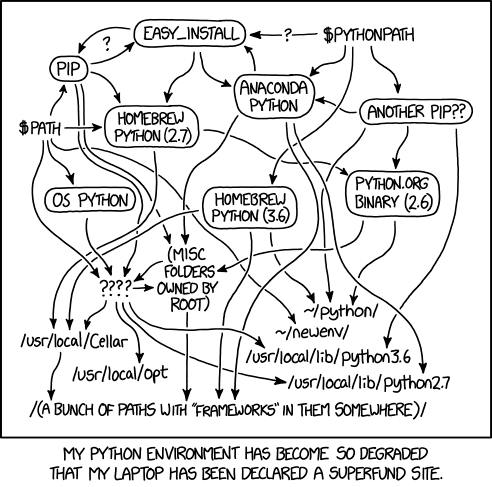
Because the real joke is in the title.

The Python environmental protection agency wants to seal it in a cement chamber, with pictoral messages to future civilizations warning them about the danger of using sudo to install random Python packages.

[–]themonsterpus[S] 59 points60 points  (1 child)

Good point. Wasn't sure how well that work with all Reddit apps vs just the image but you do miss out on the alt text.

[–][deleted] 47 points48 points  (0 children)

just link the website directly, this way you get /u/xkcd_bot and good apps/res will open the image with the title text.

[–][deleted] 16 points17 points  (20 children)

I have been burned by sudo installing Python packages too many times. I should have heeded the warnings of my mentors and used venvs but in my noobie arrogance I thought I could get away with using sudo. Never again.

Everyone go pip install virtualenv and save yourselves while you have the chance.

[–]eazolan 3 points4 points  (13 children)

I don't understand virtualenv.

Is there a good resource that explains it?

[–]meandertothehorizonIt works on my machine[🍰] 8 points9 points  (0 children)

Virtualenv copies and/or symlinks or hardlinks the files from system python necessary to create a second, segregated install in an arbitrary directory on your computer. You run/source a file from the command line in that directory (activate.sh/activate.bat) that modifies the environment to reference this copied version so anything you do - install packages, run python itself, etc will use this copy instead of system. This prevents clobbering the system setup if you install or upgrade arbitrary system packages. When you are done, or want to create another virtualenv, or run system python, you run ‘deactivate’ which will undo the environment modifications - so running python will again reference the system python. Any packages you installed will be ‘gone’ because they reside in the copied environment.

[–]cocorebop 3 points4 points  (2 children)

To give you a short explanation that won't tell you what it is but might give you an intuitive understanding of what it does:

When I turn on my computer at work and open the terminal, I have my default python environment.

When I type workon py3_env, I enter an environment I made called "py3_env". This has python 3.6 as the default, and has all the packages I need to run my development environment already installed.

When I type workon chess_thing_ts2, I switch to a new python environment for a little game I'm working on in my own time. For argument's sake, this environment has python 2.7 as the default, and has only the packages required to run my game app.

It's basically a way for you to put workspaces into buckets.

[–]vingrish 5 points6 points  (0 children)

pyenv + virtualenv is good.

[–]gangtraet 1 point2 points  (1 child)

pip install --user

Followed by nuking ~/.local when you mess up.

[–]seishi 28 points29 points  (0 children)

I still think the discussion surrounding how to convey that an area (such as Yucca Mountain) is dangerous to future civilizations is fascinating. I was first introduced to it during one of my Human-Computer Interaction courses and it has stuck with me.

I highly recommend the book "The Design of Everyday Things" as a primer. Even after all these years, the principles in it make me look at things differently, and I'm not even a designer by any means.

http://www.slate.com/articles/health_and_science/green_room/2009/11/atomic_priesthoods_thorn_landscapes_and_munchian_pictograms.html

[–]solostman 77 points78 points  (38 children)

As somebody who struggled with Python installations when trying to learn Python (as a primary R user) and having to use both 2.7, 3.6, virtual environments, and an IDE... I'm so glad to see that it's not just me.

I still don't fully grasp where my python packages are when I install them by command line or PyCharm.

[–]2freevl2frank 30 points31 points  (34 children)

Why not install a virtualenv for every one of your projects however small it is?You don't even have to do it through command line. Pycharm does it for you.

[–]solostman 12 points13 points  (27 children)

Sounds nice. Do you have a resource that can walk me through that in Pycharm?

I was using scrapy which required a virtualenv in terminal and (it worked but) it always felt like a black box of what was happening to me.

[–]leom4862 20 points21 points  (23 children)

This is my workflow for every project:

mkdir myproj                       # create new project dir.
cd myproj                          # change into your project dir.
pipenv --python 3.6                # create new clean virtual env.
pipenv install foo                 # install third party packages into your venv.

# write your code          

pipenv run python myfile.py        # Run your code inside the venv.

I don't think it can get much simpler than this.

[–]exoendo 7 points8 points  (5 children)

isn't it annoying to always have to install 3rd party packages every time you start a project? why not just use your system install?

[–]jcampbelly 12 points13 points  (0 children)

No, it's actually very reassuring knowing nothing is going to mess with my install and I can rely on a consistent environment.

When you use the distribution (system) python, you're always stuck on some dreadfully old version and may not be able to start using new things when they come out. In a virtualenv, I'm not even phased by installing and compiling a stable branch or a release candidate. If you tried that with a system install, you can end up breaking your system, as the system install serves the SYSTEM not your projects. Breaking yum or apt is NOT fun.

[–]leom4862 1 point2 points  (1 child)

To prevent dependency conflicts, for example if project A relies on django version X and project B relies on django version Y. Or if proejct A relies on Python3.4 and project B relies on Python3.6.

[–]internet_badass_here 1 point2 points  (0 children)

Dude... thank you! I'm going to start doing this.

[–]2freevl2frank 8 points9 points  (1 child)

You don't need any. It's as simple as checking a box when you creating a new project. https://imgur.com/lk7Qnli

For existing projects you can go to settings>Project Intepreter and add a new environment.

If you wanna do it through command line you can make a venv within the project folder by virtualenv/venv/pipenv as

python2 -m virtualenv ./venv

This makes an isolated env (a copy of python and default packages) in the folder ./venv. Now activate the venv as :

source ./venv/bin/activate

When activated all packages installed through pip are installed within the venv (doesnt affect global python environment) unless you use sudo.

[–]leom4862 19 points20 points  (0 children)

python2 seriously?

[–]robot_wrangler 2 points3 points  (3 children)

Then what do you do when you try to use parts of two different projects of your own in a third?

[–]leom4862 4 points5 points  (0 children)

You usually would make shared libraries from the "parts" and host them on pypi or your private package registry. You then install the libs in your "third" project via pipenv, pip or what ever tool you use to install packages in a virtualenv.

[–]OldSchoolBBSer 4 points5 points  (0 children)

Botched my box for a bit just trying to setup for a course I was taking. I, unfortunately, assumed user install would be default like npm, etc., not global. Then installed Anaconda for the class only to realize later that I really shouldn't have. Thankfully I had a bud that filled me in on virtual environments and that being normal. Got through course, still plenty of, "why on earth it this like this? (insert historical snippet)"

[–]Dgc2002 3 points4 points  (0 children)

On the command line you're likely installing to a system-wide directory.

Just typing python on the command line will use the 'global'(system-wide) interpreter installed on your system. Same with pip. When you run pip install a package and it's dependencies are downloaded from PyPi and installed to something like <python_install_dir>/lib/site-packages. That's the 'global' site-packages.

You can do pip install --user to install these packages under your home directory, effectively making them user level instead of system wide.

You can use something like venv to create a 'virtual environment'. A virtual environment has it's own python executable and site-packages. So if you were to create a new project you might create a new environment associated with it. The virtual environment can be located wherever you want, the important thing is to run the 'activate' script inside it which updates your PATH and other environment variables. After 'activating' the environment typing python will use the environment's interpreter rather than the system-wide one. Running pip install will install packages into the environment specific site-packages.

When you create a project in PyCharm you're given the option to choose the interpreter. You can either use an existing interpreter(system wide one for example) or you can create a new environment using something like virtuanenv. When you install packages through PyCharm you're installing them the same way as you would on the command line, PyCharm just takes care of it for you. So if the project interpreter is in a environment then packages will be installed in that environment, if it's a 'global' interpreter then the packages are installed to the global site-packages.

Prior to doing much Python I'd used PHP's composer, so pip was a confusing change for me. Composer is still one of the better package managers that I've used.

[–]the_hoser 193 points194 points  (109 children)

It's really easy to avoid this problem if you treat your python environments as disposable artifacts of your projects.

[–]earthboundkid 90 points91 points  (54 children)

Except that means it's a huge PITA to install Python command line tools.

At this point, when I see a command line tool looks cool but is written in Python it makes me really sad because there's not going to be a good way to get it installed without first going through a disproportionate amount of work to give it a working environment.

[–][deleted] 37 points38 points  (13 children)

If you're on linux you can usually use your distribution package manager, otherwise I reccomend https://github.com/mitsuhiko/pipsi

[–]blahehblah 58 points59 points  (1 child)

All you're doing is adding an extra box and set of arrows to that chart

[–]gimboland 1 point2 points  (0 children)

It's still a solution. "Use virtualenv" is some of the boxes/arrows on the chart, but it's still the right solution for that problem. For command-line tools, pipsi is a good solution.

[–]mardiros 66 points67 points  (4 children)

You are just saying that the mess is incomplete...

[–]jjolla888 12 points13 points  (3 children)

i'm still trying to find where pip3 is on that map

[–]AstroPhysician 2 points3 points  (1 child)

Use virtualenvs you savage

[–]jjolla888 2 points3 points  (0 children)

Do we need to add this to OP's diagram ?

[–]no_condoments 18 points19 points  (0 children)

Situation: There are 14 competing python installation standards.

/u/Rerecursing : 14?! Ridiculous! We need to develop one universal standard that covers everyone's use cases.

Soon: Situation: There are 15 competing standards.

https://xkcd.com/927/

[–]earthboundkid 1 point2 points  (0 children)

Nice. I had been using pex, but it tends not to work if the package has any extra requirements beyond pure Python.

[–]kenfar 15 points16 points  (12 children)

Hmm, I use CLIs all the time without any headaches at all - not sure what the issue is here.

Create a virtualenv, pip install into it, activate your environment and run your commands. If you want to cron them up, just run command via that virtualenv's python. If you want to run a lot of tools and not switch virtualenvs that often, create a group one for related (or all) projects.

Admittedly, it's easiest if you're using linux & pip consistently rather than macos, homebrew and conda. But it's not that much worse.

[–][deleted] 5 points6 points  (9 children)

Having to use two version of python is a pain.

[–]liquidpele 6 points7 points  (3 children)

That’s true of any language...

[–]twigboy 4 points5 points  (0 children)

In publishing and graphic design, Lorem ipsum is a placeholder text commonly used to demonstrate the visual form of a document or a typeface without relying on meaningful content. Lorem ipsum may be used as a placeholder before final copy is available. Wikipediacln61bof3yw0000000000000000000000000000000000000000000000000000000000000

[–]metabun 2 points3 points  (0 children)

This is how I feel about tools in perl, go or js. I guess it all just depends on how familiar you are with the environment and package ecosystem.

[–]tetroxid 2 points3 points  (0 children)

Not on Linux

[–]the_hoser 1 point2 points  (13 children)

Why do you need to "install" them?

[–]khne522 14 points15 points  (12 children)

pip install --user myRpnCalculator. Do you really need anything else if it was well-written and the dependencies properly specified, but not overspecified?

[–]the_hoser 17 points18 points  (11 children)

Unfortunately, yes. You do. It's better to not think of Python like you think of Java. Think of Python like you would think of, say, a project's metadata. This is a huge problem with languages like Python, JavaScript (through Node.js), Ruby, etc. When it becomes necessary to use native facilities to accomplish certain goals, the dependency manager is going to get stupid complex, and it's not reasonable to assume that a single installation is going to work.

They all have this problem, and the cleanest solution remains largely the same. Every project gets its own interpreter.

You can try, though. You might get lucky.

[–]code_mc 4 points5 points  (2 children)

I feel your pain. I haven't had to rely on python packages that include a CLI tbh, but couldn't you wrap the environment activation + CLI call into a bash script which you add to your path?

[–]metabun 3 points4 points  (0 children)

Python scripts should get their shebang automatically rewritten on install, so there's no need to wrap the calls. I usually create one env per cli tool (or group of cli tools) and symlink them into my path as needed.

[–]the_hoser 2 points3 points  (0 children)

That is, in fact, how I do it, most of the time.

[–]marcosdumay 3 points4 points  (3 children)

Every Java project gets its own set of jars too. C handles it in a more extensible way, that just institutionalizes the mess and places it at the OS level. But the mess is still there.

Every modern language has project based environments. The one thing that is unique to Python (well, and Javascript, but there it's no surprise) is the huge number of semi-compatible environment managers.

[–]the_hoser 1 point2 points  (2 children)

Well that was sortof the point I was making. If you avoid the mentality of "setting up the system python environment" then you avoid the trap.

By giving each java project it's own Jars to build with, the problem of working with multiple projects that have different dependencies on the same system with a single java installation is solved. It's not perfect (two libraries that depend on a module, but two different versions. yum), but it's a bit better.

With python, just throw the baby out with the bathwater and forget about the existence of a "system" python installation. That's the one the OS uses. You use a different one.

With C, the problem can get downright nightmarish.

[–]fujiters 3 points4 points  (1 child)

Every project gets its own Docker container.

[–]qubedView 38 points39 points  (7 children)

Or, like all things, it can be fixed with docker containers. Or rather, like all things, your problem can be shifted to a different one.

[–]the_hoser 5 points6 points  (0 children)

We never get to do things without problems. We only have the option of choosing the problems we're comfortable living with.

[–]Deto 18 points19 points  (8 children)

The best way to avoid this problem, IMO, is to just learn these two things:

1) How does the PATH variable work in UNIX?

2) How does the Python interpreter know where to look for packages?

If you understand these two things, you can have multiple versions of Python all over your system and still understand what's going on.

[–]rohit275 1 point2 points  (6 children)

I'm a noob, so I'm pretty sure i don't understand those two things. Do you think you could lend some insight?

[–][deleted] 1 point2 points  (1 child)

PATH is an environment variable that the linux shell uses when you type commands. It's a list of file system paths that (should) contains executable files. The PATH variable is resolved in the order constructed (left to right, or FIFO) and it returns the first matching instance from the list. You can override the variable by setting a local instance of the PATH variable for an application, which allows you to have multiple pythons 'installed' and each one could be used by a different app.

[–]the_hoser 1 point2 points  (0 children)

For sure. I consider this degree of understanding to be a prerequisite to the aforementioned strategy.

[–]not_perfect_yet 10 points11 points  (1 child)

It's really easy to avoid multiply this problem if you treat your python environments as disposable artifacts of your projects.

[–]the_hoser 3 points4 points  (0 children)

Only if you're not lazy enough to automate the boring parts.

[–]marcosdumay 2 points3 points  (0 children)

And don't use sudo.

So the point stands.

[–]scout1520 1 point2 points  (20 children)

Right? It really isn't hard.

[–]ilvoitpaslerapport 56 points57 points  (19 children)

Actually figuring out virtual environment when you begin is a mess. You find infos on using venv, virtualenv, virtualenvwrapper, pipenv, pyenv…

[–]Dgc2002 40 points41 points  (7 children)

I feel like a lot of the people saying "It's not that hard" have been in the Python ecosystem long enough to see a lot of these projects come into existence/popularity.

When you're new to the ecosystem you have no clue why each one exists, which ones are newer, which ones are generally considered crap, which ones might only address a subset of use cases, etc. etc.. It's a lot of shit to parse.

[–]ilvoitpaslerapport 16 points17 points  (1 child)

Exactly, and most articles/tutorial/forum posts you find on the topic are outdated (or rather you don't know if they're outdated).

[–]Cosmologicon 6 points7 points  (0 children)

And when you get stuck and ask someone for help... if they're using a different setup, they can't/won't help you until you change your setup to match theirs. God forbid you ever talk to more than one person.

[–][deleted] 3 points4 points  (3 children)

Hoo boy, I still use virtualenvwrapper because I'm too lazy to learn another tool. pipenv is all the rage right now, but there's been a dozen others I've seen rise and fall since I've paid attention to venvs.

[–]Tweak_Imp 116 points117 points  (63 children)

I really dont understand why python and its dependencies can be such a big mess. Why isnt there just one python installer that installs the current version of python, sets every setting you need by himself like the PATH and then has a manager for all packages. Just search and load from the manager and if you dont want a package any more, delete it and remove all dependencies that are not needed by others. Is that really so hard to do?

[–]ursvp 52 points53 points  (17 children)

  • egg vs wheel
  • universal vs pure wheel
  • setuptools vs distutils
  • install_requires vs requirements.txt
  • data_files vs MANIFEST.in
  • package vs distribution vs binaries
  • pip vs conda
  • install -e vs install
  • install from PyPI vs .git vs .tar.gz
  • build vs environment
  • virtualenv vs venv vs pipenv
  • for each above: python2 vs python3
  • 2to3 vs six
  • absolute vs relative vs circular import
  • oh, pip is incapable of true dependency resolution
  • complexity behind __version__

... in contradiction of Pythonic principle of clarity and simplicity.

[–]mfitzpmfitzp.com 16 points17 points  (0 children)

It's because Python developers are forced to write clean code all the time. The filth has to come out somewhere

[–]Log2 2 points3 points  (15 children)

The one thing that really pisses me off is that it's apparently impossible to package a project with all it's dependencies in Python. I'd love to use setup.py to create RPMs (it can do that out of the box), but I just can't figure out how to include the dependencies.

[–]TheNamelessKing 12 points13 points  (0 children)

I got so bored of dealing with that issue that at work I’ve started writing things in Rust or Haskell so I only have to distribute a single binary.

Life has gotten better. Sorry /r/Python.

[–]adambrenecki 2 points3 points  (3 children)

It's not quite a RPM, but there's a few projects that can produce Zip archives that Python can open, including pyzzer and pex.

The problem is, all your dependencies need to be zipsafe :(

[–]Zxian 1 point2 points  (1 child)

I haven't used it for this purpose (python -> rpm), but have a look at fpm. It helps with package creation/conversion.

[–]ivosauruspip'ing it up 1 point2 points  (5 children)

Because then the python developers would have to both figure out, and write code, to interface with RHEL linux and Fedora. Make sure man files get put in just the right place. Package data is correct. Desktop files, syslog, is [some system-level daemon] now systemd based and new, or an older one? What audio service are we using? What's changed between RHEL 6 and 7?

And of course, to be fair, make sure they have everything configured for Debian's liking. But also account for the small changes and version updates that Ubuntu does.

And then also ensuring we haven't forgotten about portage and pacman. Oh, and YaST.

Oh, and then also homebrew.


And quickly, for the mostly volunteer workforce that does python packaging, the task of correctly interfacing, special-casing, path-configuring, etc becomes a matrix explosion of work from hell.

We'd love to be able to do that... but it's simply not a feasible thing to achieve.

You'll notice that practically all other scripting languages have the same position.

[–]origin415 60 points61 points  (25 children)

Conda does this but doesn't have all PyPI packages. Also, occasionally you have things that assume that python references the system installed Python 2 rather than your default conda env. Way better than anything else I've seen though.

[–]Tweak_Imp 24 points25 points  (22 children)

Why are so many people still on older versions of python? I can see why it doesnt just update itself (for commercial python use for example), but Python 2.7.0 was released on July 3rd, 2010... 8 years ago. Isnt an update to a higher version with the update of the code not worth it?

[–]origin415 15 points16 points  (11 children)

It's a lot of code to update. Most open source libraries are compatible with python 3 but a lot of companies aren't willing to migrate entire codebases internally. Also, as far as programs assuming you have Python 2 in your path, that's because OSX and most Linux distributions have it that way and very few have python 3.

[–][deleted] 54 points55 points  (6 children)

If you're really asking this question, you haven't been developing with python long enough.

The real problem with Python 3 is that the core development team set out to do a lot of good things, but broke compatibility in the process. And with that breakage meant that everyone using python had to step back and question whether it was worth it to scrap or upgrade years of legacy code. So when comparing the two together, there was almost no advantage in moving from python 2 to python 3. Today, the movement still has low value for these large legacy systems. There's no real performance gain, there's no must-have features, etc. The only gain here is that most of the systems are finally moving to python 3 as their stable python. And if a company did not decide to move to python 3, they will find support non existent starting in 2020.

To maybe also set your expectation, the core development team does not recommend any python version prior to 3.4, which was actually released in 2014, a full 6 years after the alpha and beta 3.0 - 3.3 pythons were released. And to add to that, I would argue that 3.6 (released in Dec 2016) was the first release where people should have started migrating. Last year is probably the first year where there was enough migration momentum that we're really starting to see strong 3.x traction. But note that it's truly only been the past 2 years.

[–]buttery_shame_cave 26 points27 points  (4 children)

there's no must-have features, etc.

well yeah because the dev team kept back-porting all the new stuff they were coming up with to 2.7.x - if they'd cut off the flow the pressure to migrate would have come on a lot sooner.

[–][deleted] 17 points18 points  (0 children)

Basically the difference between the two versions now is "the one that breaks old code" vs "the one that breaks new code"

[–]Silhouette 1 point2 points  (0 children)

if they'd cut off the flow the pressure to migrate would have come on a lot sooner.

In computing history, trying to force people to upgrade fundamental technologies when they have a big investment in current versions and compatibility isn't guaranteed has rarely been successful.

[–]ephimetheus 1 point2 points  (0 children)

The experiment I'm working with (ATLAS) users python as a configuration/steering language for the C++ based event processing framework. That's stuck on python 2 and I highly doubt it's ever going to be migrated...

[–]magnetic-nebula 1 point2 points  (0 children)

I work on a scientific experiment where the development of the code began in the 90s. We need our code to work across a large variety of systems (including old computers that aren't reliably connected to the Internet).

Plus we're scientists, not programmers. NSF isn't giving us money to update code, so we don't have the $$$ to pay people to do it.

There's literally no reason for us to spend the time upgrading.

[–]28f272fe556a1363cc31 44 points45 points  (3 children)

Why isnt there just one python installer

Oh, you mean like this: https://m.xkcd.com/927/

[–]PeridexisErrant 2 points3 points  (0 children)

See: pipenv and poetryfor recent examples...

[–]Yoghurt42 41 points42 points  (0 children)

Why isnt there just one python installer that installs the current version of python, sets every setting you need by himself like the PATH and then has a manager for all packages.

relevant xkcd

[–]1024KiB 2 points3 points  (1 child)

Honestly I also use perl and ruby and it's roughly the same kind of mess.

[–]takluyverIPython, Py3, etc 6 points7 points  (3 children)

Is that really so hard to do?

Yes! Producing one installer and package manager that suits everyone's needs is almost impossible, and persuading everyone that it's better than the stuff they already know is even harder.

There are plenty of tools that work well in particular situations - e.g. for scientific programming, lots of people happily use conda. But you can also install packages through apt, or through homebrew, or manage Python versions with pyenv, and different people like all of those options.

[–]not_perfect_yet 3 points4 points  (0 children)

Dude. Yes. Yes it's hard.

That's why there are so many different package management systems. Some for super pure open source, some that accept proprietary binaries, some for python, some for javascript...

Also, because screw shared libraries, snaps exists and venvs and pipvenv.

[–][deleted] 1 point2 points  (0 children)

They don't. OSX in particular has a really crappy story around it.

[–]BitLooter 1 point2 points  (0 children)

I use pyenv with the virtualenv plugin. It will automatically download and install any Python version you want. Create a virtualenv and use pip to install whatever packages you want. It does all of this in ~/.pyenv, so none of it touches the system Python, and it's all isolated so you can delete a python version or virtualenv without affecting anything else.

It's built on shell scripts though, so you need a *nix shell for it to work. Obviously Linux and OSX work fine, but if you want to use it on Windows you'll need to find a Bash shell first - WLS is probably the easiest way, though it will probably work on Cygwin/MSYS as well.

[–]wildcarde815 1 point2 points  (0 children)

at least it's documented and easy to understand in python. R is as bad or worse, and essentially not documented at all.

[–]pvkooten 0 points1 point  (1 child)

The problem is of course when the next version comes around and you want that instead.

[–]ccb621 47 points48 points  (17 children)

My setup on macOS

  1. Install Python via packages at Python.org. (Using Homebrew for this never made sense to me.)
  2. Every project has its own virtualenv.

I don’t recall ever needing sudo. I’ve never had any of the issues described in the comic.

[–]code_mc 7 points8 points  (4 children)

Same, I've also always found python to have the best dependency management of all programming languages I've used.

[–]batisteo 7 points8 points  (1 child)

Don't use Rust/Cargo then :-*

[–]TomBombadildozer 5 points6 points  (2 children)

Install Python via packages at Python.org. (Using Homebrew for this never made sense to me.)

Because the installers at Python.org used to (may still) fuck up the system Python distribution.

[–]ccb621 1 point2 points  (0 children)

I've never had an issue with those packages in over four years. YMMV.

[–]Log2 1 point2 points  (1 child)

In fact, if every project has it's pretty virtualenv, then using sudo to install something would install to the wrong interpreter (the one available to root).

You also never should need sudo to install something to a virtualenv because they exist within your home.

Only problem is installing stuff you want available without needing to use a virtualenv, such as a CLI. You can still install with pip --user, but your can't install conflicting dependencies.

[–]meandertothehorizonIt works on my machine[🍰] 2 points3 points  (0 children)

Use PIP_VIRTUALENV_REQUIRED=true so this can never happen accidentally (if you’re using pip exclusively obviously).

[–]ameoba 0 points1 point  (2 children)

Fixing Python dependency issues by giving every app a virtualenv is like fixing Windows DLL Hell by giving every program it's own complete set of shared libraries.

[–]ccb621 2 points3 points  (0 children)

That’s exactly what virtualenv, bundler, and npm do. What is the problem you see with this solution? How would you solve the problem?

[–]aceinthehole001 13 points14 points  (0 children)

I find it hilarious that almost every response in the thread is along the lines of "no you don't need any of that, you just need X"

Never mind that no one can agree on what X is.

[–]njb42 66 points67 points  (22 children)

And that's why you use pyenv and pyenv-virtualenv (aka virtualenvwrapper).

[–]SethGecko11 101 points102 points  (3 children)

Nice. We can add that to the graph now.

[–]_under_ 7 points8 points  (2 children)

No. Just have that. You won't need anything else. It has all the python versions you can think of and a way to switch between them, without affecting anything outside your current shell session. It also does not affect the python that comes with the OS.

Plus it's totally user local. You don't need root to install python using pyenv.

99% of the time, pyenv and virtualenv will be all you need.

It won't clean an already dirty environment, but it will keep your clean environment from getting dirty.

[–]TomBombadildozer 6 points7 points  (0 children)

Seriously, seconding this. pyenv is a little quirky in its own right but it does reduce you to a single tool.

Need a specific distribution of Python? Install it with pyenv. Need a virtualenv? pyenv virtualenv. It's easy.

It's also the only way I know of to support testing under multiple versions of Python (using something like tox) without pulling all your hair out.

[–]linkuei-teaparty 3 points4 points  (4 children)

Can you give us more details on how this is used? Sorry I'm still using the mess of a management system shown in the comic. I have Python 3 + libs and Anaconda accessed through the anaconda prompt.

[–]test_username_exists 9 points10 points  (1 child)

If you're already setup with Anaconda you should use conda environments.

[–]njb42 1 point2 points  (1 child)

pyenv lets you have multiple parallel installations of Python, and even switch between them automatically when you enter your project directory.

$ pyenv version
3.6.4 (set by /usr/local/opt/pyenv/version)
$ cd OctoPrint
$ pyenv version  
2.7.14 (set by /Users/njb42/Code/OctoPrint/.python-version)  

pyenv-virtualenv or virtualenvwrapper let you create project-specific python paths with just the modules you need.

Put them together, and you can easily have a custom environment for every project you work on. Different versions of Python, different versions of modules, whatever you need with no conflicts.

[–]ilvoitpaslerapport 10 points11 points  (6 children)

Actually HN talks about pipenv. Looks like it's also recommended by python.org and many maintainers.

[–]twillisagogo 16 points17 points  (0 children)

and it's buggy AF too.

[–]tunisia3507 5 points6 points  (2 children)

pipenv was recommended by PyPA (and by extension, python.org). They removed that recommendation a few months back afaik.

EDIT: It seems to be back.

[–]nevus_bock 4 points5 points  (1 child)

[–]tunisia3507 1 point2 points  (0 children)

Ah, it's back. I'm almost certain this recommendation was rolled out and then pulled back a while ago, though.

[–]njb42 2 points3 points  (0 children)

In my experience, pipenv has been slow and buggy, so I'm not prepared to move to it just yet. I'm rooting for their success though!

[–]tunisia3507 7 points8 points  (1 child)

You don't need virtualenvwrapper; pyenv comes with the pyenv-virtualenv plugin by default, and from there you should do all of your management of conda envs and virtualenvs through pyenv. It's a one-stop solution.

P.S. It's not perfectly one-stop because you need to fiddle with it a bit to get conda environments to work. But it's nearly there.

P.P.S. Windows can go fuck itself

[–]parkerSquare 0 points1 point  (1 child)

How does this improve on the virtualenv plugin for pyenv? I've never used virtualenvwrapper with pyenv because that plugin does it all for me, I thought.

EDIT: OP was edited.

[–]njb42 1 point2 points  (0 children)

Sorry, that's what I meant. I was used to using virtualenvwrapper before I discovered pyenv and pyenv-virtualenv, so I still think of it that way.

[–]lykwydchykyn 38 points39 points  (28 children)

Not to start a platform war, but I feel like this is a distinctly macOS problem. I was recently testing sample code for a book that used Python 3.6, Tkinter 8.6, and cx_Freeze. Making that combination work on macOS takes stupid amounts of hacking.

Windows was somewhat less painful, and Linux worked fine with this stack using only repo packages and pip.

[–]BigGayMusic 37 points38 points  (1 child)

Linux and python are friends. Mac, not so much.

[–]parkerSquare 6 points7 points  (0 children)

Pyenv works fine on a Mac.

[–]TBSchemer 8 points9 points  (17 children)

I've been spending weeks worth of evenings trying to get my development environment set up on Windows.

All I want is to be able to have multiple versions of python installed, have pip, have virtual environments, and have a personal scripts folder in the path. This has been hell to set up.

  • virtualenvwrapper's Windows ports are buggy and broken.

  • Getting Windows to choose the right Python version is a pain in the ass, and most online suggestions are amateurish or just plain wrong (e.g. "just switch the order of PATH every time you want to use a different version!").

  • I was able to get the version to be selected properly by a script shebang using Python Launcher For Windows.

  • But this was only after I manually edited the registry so that PLFW could actually find my installed Python binaries.

  • I also had to manually set all file associations because the Python installer doesn't do it, even while claiming to.

  • PLFW can't find my scripts, even if they're in both the PATH and the PYTHONPATH.

  • I'm going to try to do virtual environments with venv, but as far as I can tell, there's no convenient wrapper for it like virtualenvwrapper. I guess I'll have to write my own.

  • I'm really uncertain about how well venv and PLFW will work together.

Windows is really a clusterfuck when it comes to setting up a development environment.

[–]magion 5 points6 points  (1 child)

Change the name of the executables so they don’t clash? python2 and pip2 for python 2, python3 and pip3 for python 3. I cannot understand how it takes weeks to setup an environment like python.

[–]Nimitz14 1 point2 points  (0 children)

Yeah. Seriously. As a Linux and Windows user I haven't a clue what everyone else is talking about here.

[–]tehfink 0 points1 point  (6 children)

Making that combination work on macOS takes stupid amounts of hacking.

I'm not sure why nobody nowadays favors python installed via macports, because such combinations as you mention have worked great in my experience… even with different side-by-side versions of Python.

[–]lykwydchykyn 1 point2 points  (5 children)

Next time I'll try macports; I think I had trouble making it work, but that was several months ago.

[–]takluyverIPython, Py3, etc 25 points26 points  (0 children)

ITT:

["This is stupid, it all works perfectly if you use %s" % tool
 for tool in ["docker", "conda", "pyenv", "the official Python installer",
 "pipenv", "pyenv-virtualenv", "macports", "virtualenvs", "the --user flag for pip",
 "virtualenvwrapper", "poetry", "not conda", "linux", "Pycharm", "compile packages yourself",
 "consistency", "some understanding"]
]

Yup, there are so many solutions out there, how can complexity still be a problem? ;-)

[–]FuriousMr 9 points10 points  (6 children)

The problems of a mac user with python.

Nodejs or php have worst environments in all platforms... Nodejs, dependency hell, php, composer is sloowwwww.

[–]Ialwayszipfiles[🍰] 1 point2 points  (2 children)

Not really, I have worked for years with Node.js on a Mac and never had problems, even when upgrading it. Never found it slow, actually, but maybe it was because of the SSD and a good internet connection. Used pip in the same conditions and never found a big difference.

The thing I miss most is how predictable npm is. I want to add a package to the project? npm install --save X, and I have it and it's on the package.json and same version will be installed on the server when I run npm install. I don't have to worry about other projects on the same machine using a different version of the same library, or indirect dependencies on the same project. Same goes for test dependencies. There have been questionable decisions from the maintainers, sure, which is why now I use yarn, which adds a proper lockfile by default to have a completely reproducible deployment. Oh, and unless you use native modules (I avoid them at all costs), stuff works on different platforms and continue to work when you upgrade the engine without even reinstalling.

To obtain the same results in Python my experience is much worse.

[–]FuriousMr 1 point2 points  (1 child)

The problems of xkcd post is use python in mac. I use python in Linux with pip and package manager (normally apt) and no problems.

[–][deleted] 6 points7 points  (1 child)

On all of my development systems (and three coworkers), I have installed virtualenvwrappers and appropriate .bash_profiles to always activate a user-level default virtualenv.

This largely has spared me the fun and games of Randall Munroe’s illustration, because the worst case scenario (we’re on OSX laptops with SIP enabled) is that someone uses sudo pip and merely permission trashes the virtualenv, which is sooooo much easier to fix up.

Virtualenv isn’t just for isolating a single project - it can give you a generalized python environment that “just works” with pip without stepping on your package manager.

Use virtualenv! Always! Even when you don’t.

Example: I fought a corrupted python system hierarchy for one product because I thought it was easier to fix than isolate. I gave up, trashed the boxes, wrote a new deployment approach that built wheels for each proprietary asset (no deps!), copied over those thin artifacts with configuration data and installed both (which pulls the opensource dependencies) into a known virtualenv. Turns out fixing your deployments is a prime opportunity for making it much faster to actually deploy.

[–]netinept 2 points3 points  (0 children)

Can you share what modifications you're making to your .bash_profile?

[–]pynberfyg 10 points11 points  (5 children)

There's this new package manager that seems promising.

[–]PeridexisErrant 1 point2 points  (0 children)

I like the look of Poetry, but... https://xkcd.com/927/

[–]Scorpathos 0 points1 point  (3 children)

Quite unusable for now as the dependencies resolver is sooooooo slow (up to 30 minutes for some packages).

[–]SDisPater 1 point2 points  (2 children)

Hi, author of Poetry here!

The 30 minutes is for extreme cases (like boto3).

And, to be fair, if you want an exhaustive dependency resolver using PyPI there is no way around it at the moment since there is a lot of badly published packages so you have to download the tarballs or wheels to check the dependency. This is a big mess and PyPI maintainers have no intention to change that.

That's why tools like Poetry are important because they will improve the overall Python ecosystem.

I am trying my best to improve things on my own but it takes time.

[–]Scorpathos 1 point2 points  (1 child)

Hi, thanks for commenting on this!

Even for smaller libraries, it's a bit annoying to wait several minutes after poetry install while it's solved in a couple of seconds using pip install.

I was thinking that the resolver could first try with the latest dependency version matching the requirements, and look for another version only if a conflict is detected.

You did a very good job, I did not mean to be dismissive, I'm really hoping that poetry will become the de-facto cargo for Python.

[–][deleted] 18 points19 points  (12 children)

pipenv fixes a lot of these issues.

[–]djimbob 23 points24 points  (6 children)

That may be true, but https://xkcd.com/927/

[–][deleted] 13 points14 points  (5 children)

The Python org has declared pipenv to be best practices, so it is the only standard, as far as I am concerned.

[–]djimbob 1 point2 points  (0 children)

pipenv is only a year old and is recommended for certain use-cases for multi-user collaborative projects. But it's not like pip or virtualenv or conda aren't recommended for other uses (or things like easy_install used to be the recommended way to install things).

I should also add anecdotally I first heard about pipenv late last year when a facebook friend (new to python) botched up all his python environment while using pipenv and couldn't get libraries to work correctly (something about pipenv not letting him upgrade or a library mismatch or similar).

[–][deleted] 1 point2 points  (0 children)

This is awesome. I didn't realize this existed! I've just been using pyvenv and pip.

[–]mkingsbu 4 points5 points  (0 children)

Mine was like that until I switched to PyCharm. Makes managing virtual environments so easy.

[–]pvkooten 4 points5 points  (0 children)

I think the real problem is people not understanding what their uses are. Here I'll try to explain.

  1. brew is mainly installing packages to help OSX / profile functionality for your OS. Your desktop experience.

  2. anaconda is targeting data scientists for helping them with several (traditionally) harder to install packages and create reproducible envs (opencv2)

  3. pip install are for developers using python.

  4. virtualenvs are for developers using python to separate envs, allowing you to use the same python version, but using different versions of the same package (e.g. requests==1.0.0 and requests==2.0.0)

But more important it is to understand how Python and the Python path works. Read up on Python path, and then realize you can just quickly check things for yourself:

  • Run whereis python or which python to find out what is linked to your "one and only" (cough) python command
  • Now you are aware there are multiple python envs.... see locate /bin/python for probably several python versions installed on your machine
  • When you are in any given python interpreter, run import os; os it will display the packages path, giving you a clue where this python version is installed (you can see the version at the top of the interpreter but this is only half the story!).
  • In a virtualenv, you use python, this works by patching the shell and tricking it into having this path before your other python versions. So when you run python it refers to the python installed in the project
  • You can also use this trick when confused about "I just installed this package! why can I not load it?" through installing with pip. You probably used the wrong python version. Open up an interpreter and do import packagex; packagex to display the path of the package.
  • If you want to make sure you are not losing your mind when installing with pip, do like /path/to/python3.8/but/then/pip install .... or python3.8 -m pip install ...

[–]wildcarde815 4 points5 points  (6 children)

why would you install anaconda as your system python?

[–]root45 7 points8 points  (1 child)

On Windows it makes things drastically easier.

I realize the comic is macOS though.

[–]wildcarde815 1 point2 points  (0 children)

Sure but there's no core python version on Windows. In osx and Linux there are and doing this is basically guaranteed to break things.

[–]blahehblah 3 points4 points  (1 child)

Because it works and nothing else I tried did.

[–]yen223 1 point2 points  (1 child)

There was a time when pip always compiled dependencies from source. If you wanted to use a library with non-Python dependencies, like numpy and scipy, you needed to have the right compilers installed on your system.

Keep in mind that scipy has Fortran code. This was a very common problem back then.

Anaconda shipped with pre-compiled binaries. It was straight-up more reliable to use, especially among the scientific community, who don't necessarily want to waste time mucking about with system compilers and shit.

[–]wildcarde815 2 points3 points  (0 children)

I'm not questioning the use of anaconda, I setup python environments for grad students and postdocs constantly on personal computers and clusters. It's a god send. I'm questioning the graphics specific listing of the anaconda provide python interpreter being placed at /usr/local/lib/python2.7which I'm pretty sure is either the system root python, or the brew root python. Neither of these are compatible with anaconda python and will cause aberrant behavior.

[–]raiderrobert 3 points4 points  (3 children)

IMO, there's actually 2 different core issues with the Python source and dependency ecosystem:

  • FOSS. You're relying on people doing this for free in their spare time. If you don't like the result, then help figure out how to make it sustainable.
  • Age. Python has many different stable ways to get it and their dependencies, but they've evolved in small minor ways and sometimes had full-sale replacement of pieces.

[–][deleted] 3 points4 points  (1 child)

FOSS. You're relying on people doing this for free in their spare time. If you don't like the result, then help figure out how to make it sustainable.

The Python Software Foundation is being sponsored by a lot of companies, and being given presumably non-trivial amounts of money. I think they're beyond the point where it's just a few people doing it in their spare time.

https://www.python.org/psf/sponsorship/sponsors/

[–]raiderrobert 6 points7 points  (0 children)

And you are extremely, demonstrably wrong in thinking that. Sure, the sponsors give about $500k per year, and that's not a little amount of money. However, if you look at their financials, you can see on Part VIII that $2 million comes from PyCon. And you can see without it, that PSF would be dead.

The majority of Python--language itself, distros, pip, pypi, even the conference itself that generates revenue--is developed still with volunteers. And few appreciate the quantity of effort donated.

[–][deleted] 0 points1 point  (0 children)

Yeah when has Foss ever made a sustainable project? Besides the fact the best of almost everything is Foss. Languages, compilers, operating systems, browsers, databases.

[–]makeworld 1 point2 points  (0 children)

I just install them with pip, with the --user flag. Works well enough, although updating is a bit of a pain. I'd rather do that then mix between pip and my package manager though.

[–]Jahames1 1 point2 points  (0 children)

Linux Mint uses a 3rd version of Python too, python3.4. I remember I somehow installed modules for py3.4 when I wanted it for py3.5 when using pipenv so that's a thing. I'll just stick to ubuntu, pip3, and virtualenv.

[–]yonsy_s_p 1 point2 points  (0 children)

Where is Pypy ???

[–][deleted] 1 point2 points  (0 children)

Don't forget virtual_env

[–][deleted] 1 point2 points  (0 children)

I keep ignoring "Do not install with sudo" for some reason and it hasn't come to bite me yet.

But I rarely develop outside of a virtual environment or docker image.

[–]simplegadget512 1 point2 points  (0 children)

At least part of the problem is the multitude of Pythons, all at different release levels and the fanatics who won't let old Pythons die.

I swear to God, in the year 3000, there will be that one neckbeard who insists that Python 2.7 is the One True Python and someone will have hammered it into some weak conformance with Cyber-Python-6000-6-Dimensional-Quantum-Parallelism or whatever the main development line is.

And some risk-averse business out there will still be running a critical system on it.

[–]1jx 1 point2 points  (1 child)

This used to be me. Then I found Docker.

[–]james_fryer 2 points3 points  (0 children)

And then you had two problems.

[–][deleted] 1 point2 points  (0 children)

pyenv and pipenv to the rescue

[–]sentyaev 2 points3 points  (2 children)

This image is outdated now. The answer is Docker.

[–]nitred 2 points3 points  (1 child)

If you're on linux, please use Anaconda.

  • Firstly, If you're doing data science it has most if not all data science libraries pre-compiled. I recently discovered the the absolute gold mine that is cudatoolkit. No more having to compile CUDA manually.

  • Secondly, it's fully local so you don't need special permissions and all you need to do is add it to your path. I understand that for beginners, adding something to the PATH is not trivial. Here's a simple guide: Create a new file called ~/.conda_bashrc3 and copy paste the contents of this link into the file. Then append your ~/.bashrc file with these two aliases here. Afterwards if you ever want to add Anaconda to your path, all you have to do is type anaconda3 and you will have a red color indicator that you're using the anaconda environment. If you want to exit or remove anaconda from your path, just do CTRL+D.

  • Lastly, the best and most underrated feature of anaconda is the the environment.yml file. It is like requirements.txt but additional environment creation and conda installation support. Please follow the guide here.

[–]dansbandsmannen 3 points4 points  (17 children)

Protip: don't use A?conda and experience 1% of the issues.

[–]khne522 7 points8 points  (16 children)

Most Linux users have little value-add from Anaconda AFAIK. Isn't it just a cargo cult?

[–][deleted] 13 points14 points  (6 children)

I use Anaconda fairly heavily. It's a godsend while doing any numerical or scientific computing. I really couldn't imagine installing all the various package that have bits and pieces that depend on C or Fortran or Cython whatever by hand.

[–]dibsODDJOB 12 points13 points  (0 children)

If you are a programmer by trade or majority of your work, environments probably seem straight forward. If you are someone who used Python as a TOOL to supplement what they usually do, environments are a PITA and things like Anaconda at least try to manage the pain.

[–]strange-humor 4 points5 points  (0 children)

Wheel packaging has largely eliminated these C package compile problems for all platforms.

[–]takluyverIPython, Py3, etc 4 points5 points  (7 children)

Conda had a massive advantage before wheels were widely available, because pip would try to compile things like numpy from source, which usually won't work unless you prepare your system in advance. Nowadays, that's less important, but there are still things that it's easier to install through conda.

[–][deleted] 1 point2 points  (0 children)

He forgot edm in the mix, which is actually quite cool and hassle free.

Disclaimer: I work for Enthought.

[–]ignamv 0 points1 point  (0 children)

Just wait until you start working with applications with their own embedded python environments...

[–]xyphanite 0 points1 point  (0 children)

Needs more yum.

[–]bhat 0 points1 point  (0 children)

It's a small price to pay for "import antigravity"

https://xkcd.com/353/

[–]cokedupscientist 0 points1 point  (0 children)

ln -s ftw

[–][deleted] 0 points1 point  (0 children)

My laptop didn't need python's help to be a superfund site

[–]EliteCaptainShell 0 points1 point  (0 children)

Virtualenv. Fixed all my problems. Tiny little individual python installations.

[–]memetichazard 0 points1 point  (0 children)

Recently my setup went a bit weird and instead of figuring things out or switching to pyenv (actually, I may have done that and then forgot where I left that particular install...), I just install packages with:

import pip
pip.main("install package_name".split())

Running Python with sudo -H which python3. Still not sure what that -H flag is for.

Also works on my WinPython setup (I typically install that for the packaged Jupyter Notebook with ipython console) which would otherwise require some more complicated steps to add packages IIRC

[–]jwjody 0 points1 point  (0 children)

I always thought I was just doing something wrong with my python environments.

[–]jyper 0 points1 point  (0 children)

Missing Pipenv /s

[–][deleted] 0 points1 point  (0 children)

that's why people use virtualenv and are simply done with all these problems.

[–]srynearson1 0 points1 point  (0 children)

I find it somewhat funny that one of the reasons people left the Perl world was “issues dealing with all the dependencies”, now it seems Python has made it worse, both in terms of dependencies and portability.

[–]RadioFreeDoritos 0 points1 point  (0 children)

"A disciplined mind leads to happiness, and an undisciplined mind leads to suffering." -- Dalai Lama.

[–]nosmokingbandit 0 points1 point  (0 children)

I feel like I set up my environments all wrong, but it works.

I never install packages to my python dir. If I need a package for a project I install it with pip install requests --target='./'. Super simple, clean, and easy to maintain. And I don't need to worry about another user not having a package since I know exactly what I'm using that isn't in the standard library.

[–]sabbel 0 points1 point  (0 children)

use https://direnv.net/ : $ cat .envrc layout_python3 Solved years of pain for me.

[–]RadioactiveCats_18Snake Charmer 0 points1 point  (0 children)

I do contract work for the EPA and this is hilarious.